DALI IO Manual
Introduction
Hello!
Thank you for choosing DALI IO headphones.
At DALI, we are driven by a raw passion for music and its honest reproduction. The development and refinement of new technologies to increase the realism of the home entertainment experience is the main objective in our quest to create what we believe to be the best headphones in the world.
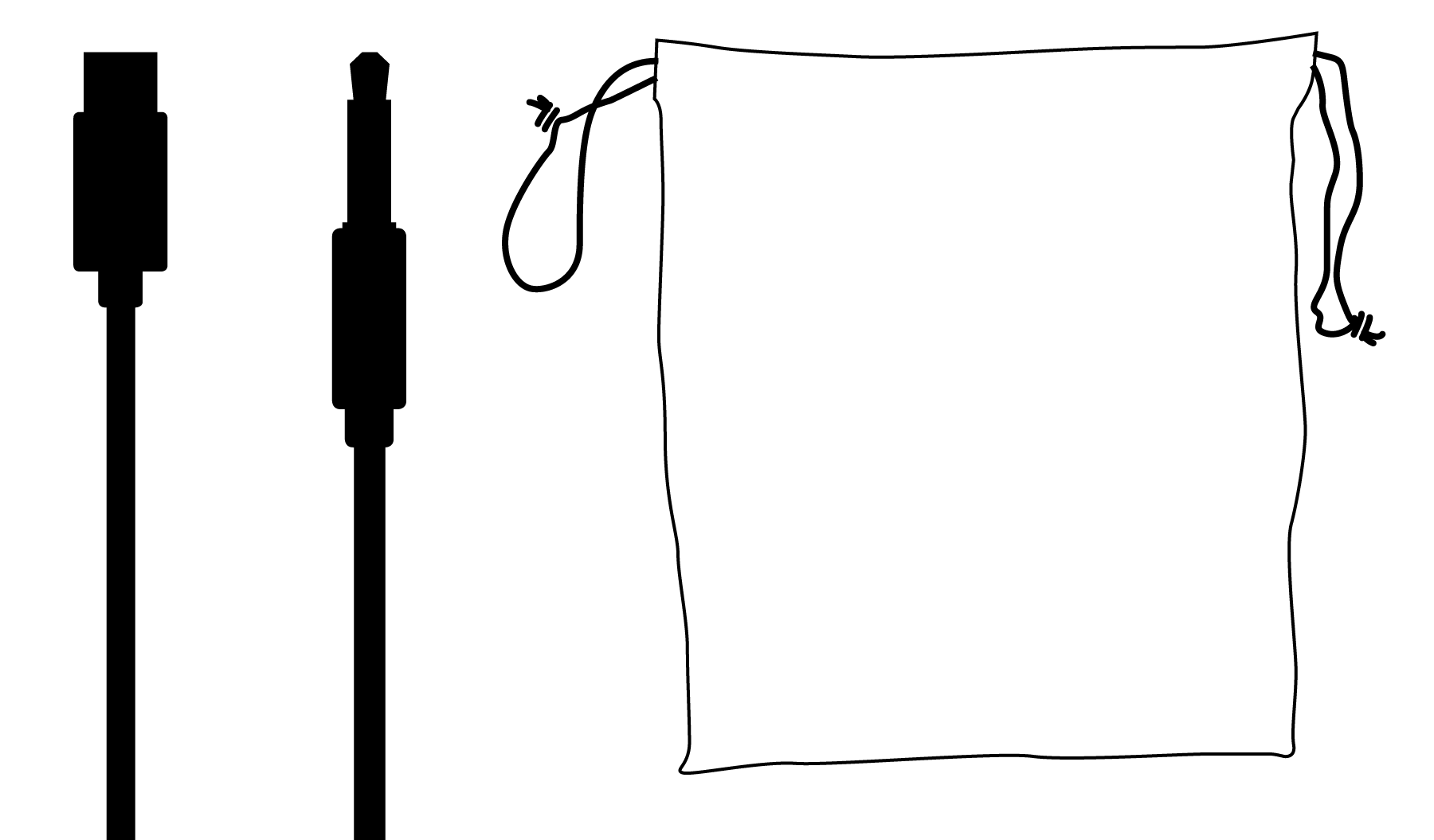
Your DALI IO-4 headphone packaging contains:
- USB-C cable
- 3.5 mm stereo cable
- String bag
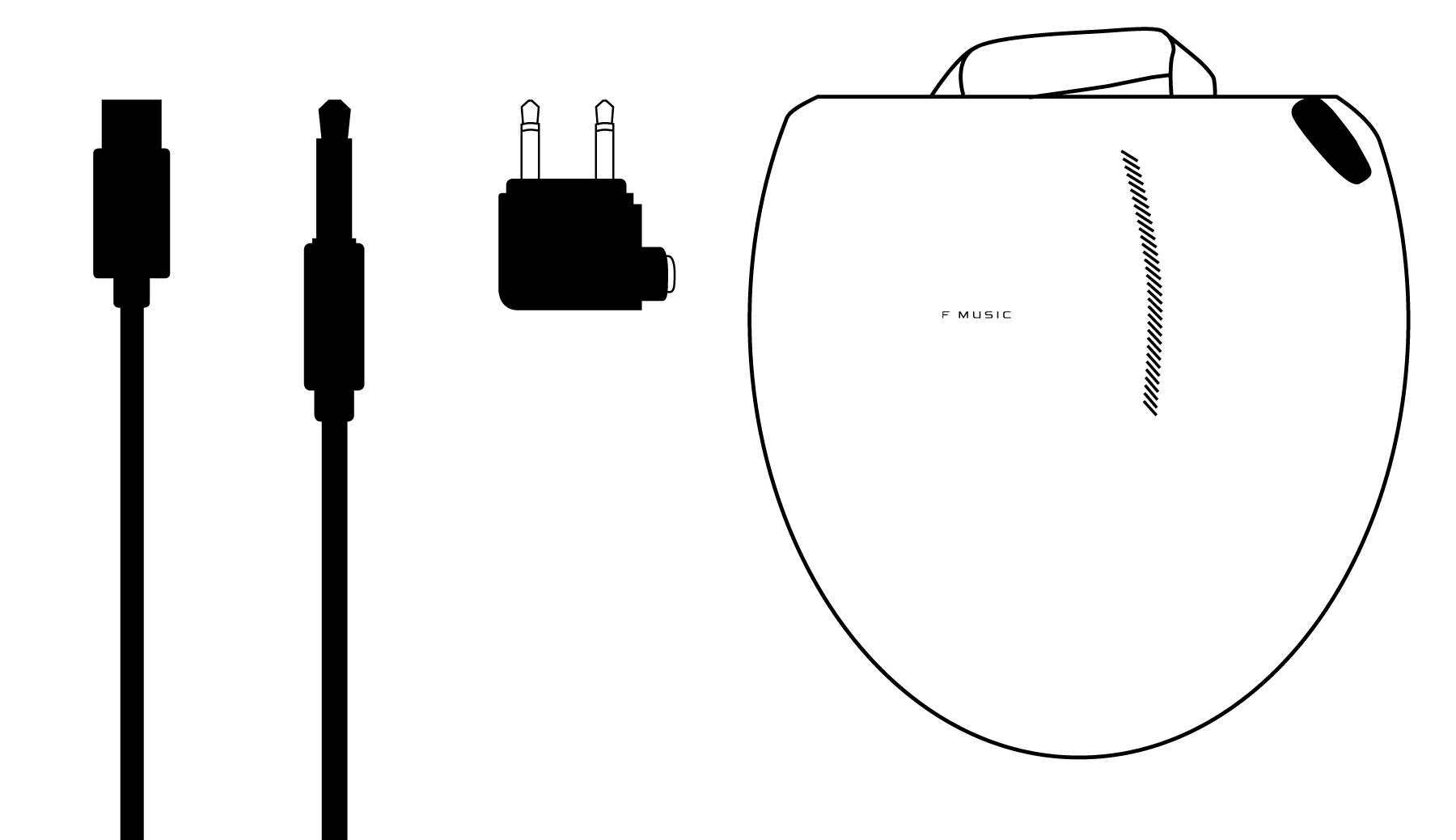
Your DALI IO-6 headphone packaging contains:
- USB-C cable
- 3.5 mm stereo cable
- Flight adaptor
- Travel case
Note
Please be careful not to damage any items while unpacking the carton. In the unlikely event that anything is missing, please contact your DALI retailer or distributor. You may wish to consider keeping the packaging for potential future use. Otherwise, please dispose of the packaging responsibly, recycling components as appropriate.
Getting To Know Your DALI IO Headphones
The DALI IO-4 and IO-6 are rechargeable, Bluetooth wireless headphones that can also be used with either a USB or a conventional wired connection. The IO-6 model additionally incorporates optional active noise cancelling (ANC).
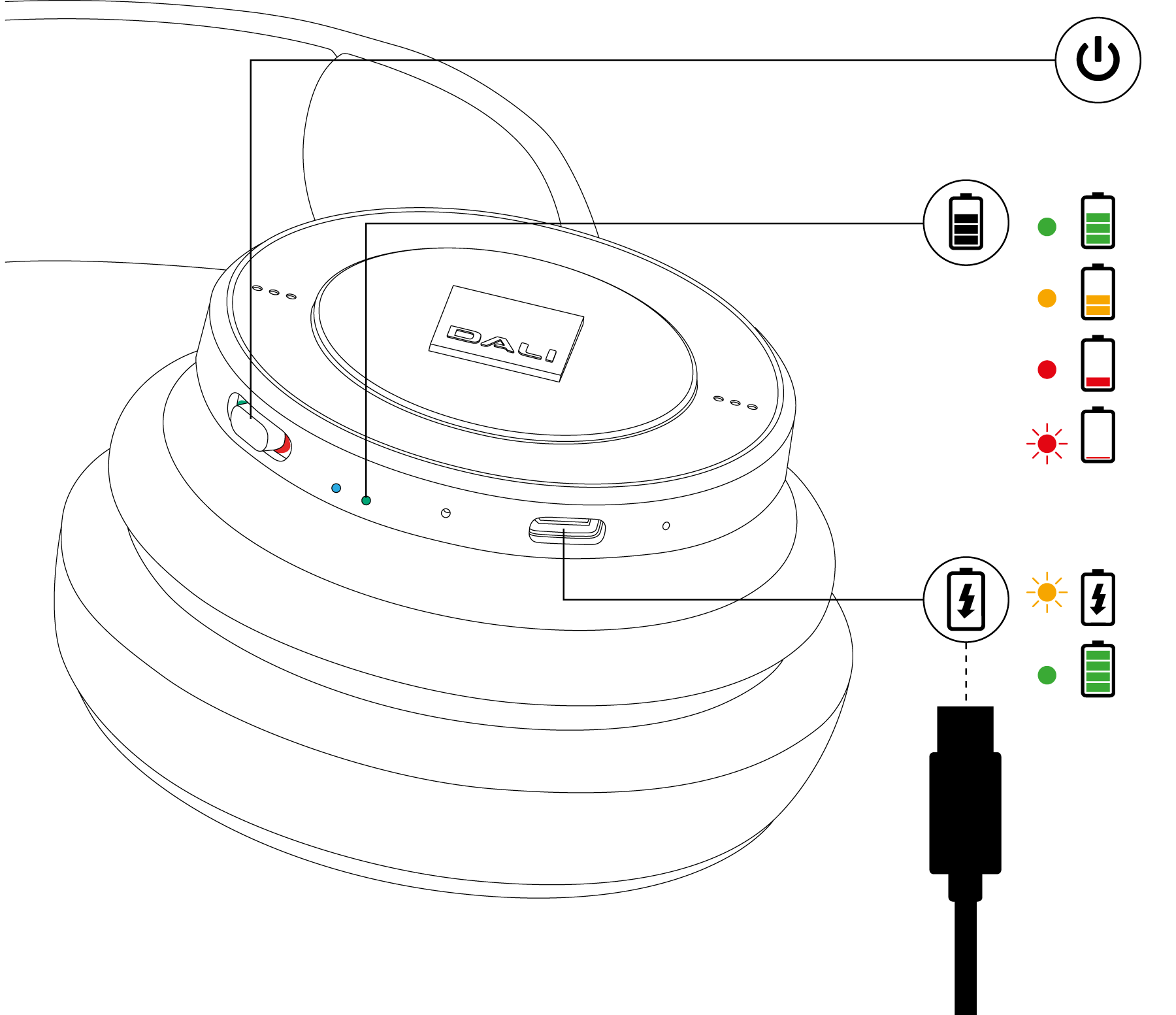
The control buttons, connection sockets and indicators of the IO headphones are illustrated in the diagram to the left.
They are described in the next sections.
Note
Your IO headphones will play voice prompt audio messages to guide you and alert you to their operational status.
Usage
Get started
Your IO headphones are shipped with adequate battery charge for initial use so they can be switched on and enjoyed immediately.
- To switch on your IO headphones slide the power switch to the ON position so that the green indicator is visible. When switched on and disconnected from a battery charger, the remaining battery charge level will be displayed by the battery indicator. The battery indicator will change colour from green (>50% charge) via orange to red to indicate decreasing charge. The indicator will flash red when battery charge is critically low.
- Even though your IO headphones will have battery charge when first switched on, it is recommended that you connect them to a charger using the USB cable supplied. A standard USB mobile phone charger or a computer USB socket that incorporates an appropriate power supply can be used. When connected to a charger, the headphone battery indicator will flash amber while charging and illuminate in solid green when fully charged.
Note
Battery charge level is reported audibly by a headphone voice prompt at switch on and when critically low.
If your headphones are left switched on with no audio source playing, with no mini-jack connection, and with noise cancelling disengaged (IO-6 only), they will switch off automatically after 10 minutes.
Bluetooth Connection
To connect your IO headphones to a Bluetooth audio source such as a smartphone, the headphones must be switched to Bluetooth pairing mode.
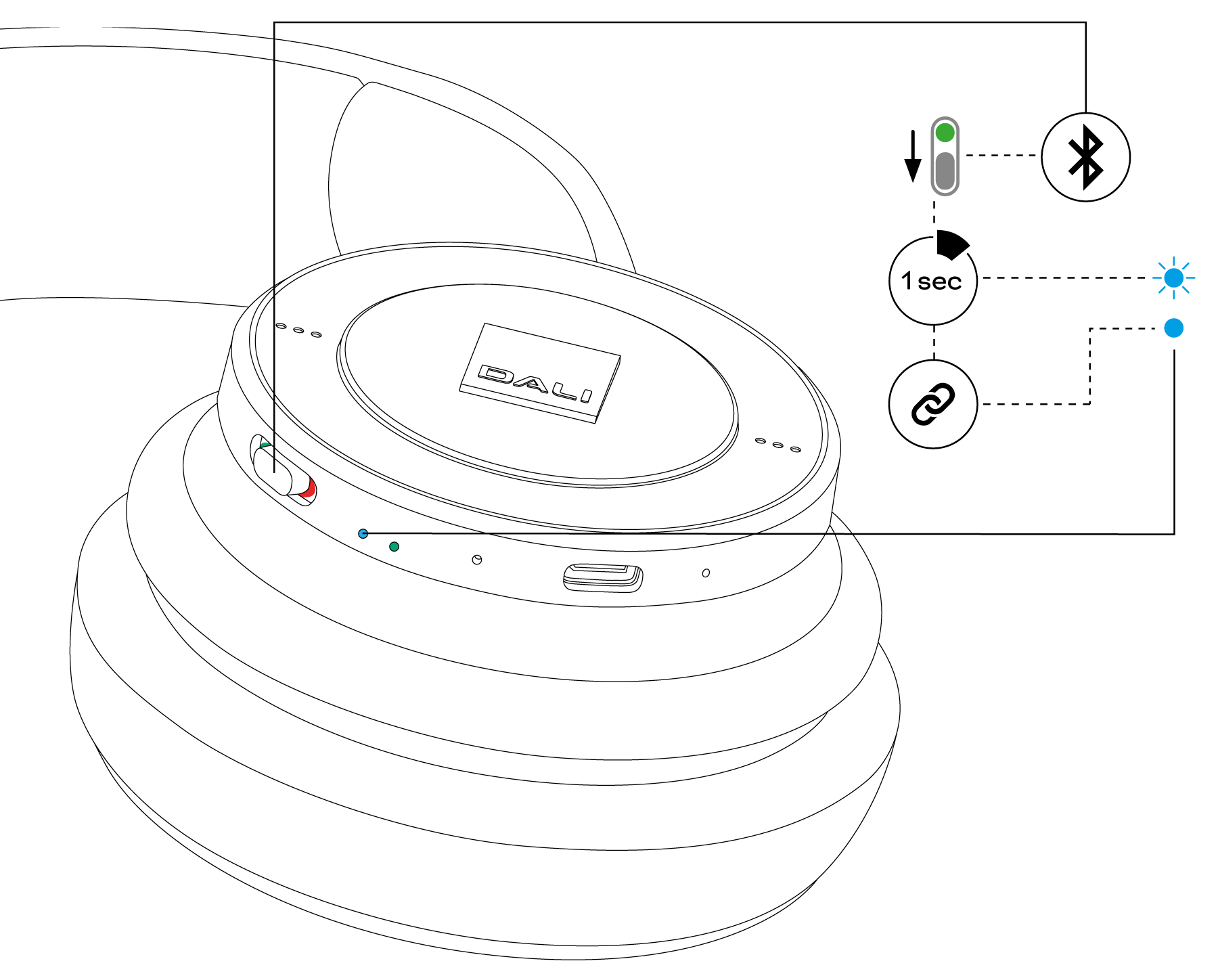
- To engage Bluetooth pairing mode, switch on the headphones and push the Power switch against its furthest sprung position for one second.
The headphone Bluetooth indicator will pulse blue to indicate pairing mode. - Now open the Bluetooth setup menu on the device you wish to pair with your headphones and select “DALI IO” in the list of available connections.
The Bluetooth indicator on the headphones will be constantly blue when connected to a Bluetooth device. When you subsequently play music or make and receive calls from the Bluetooth device, its audio stream will be routed through the headphones.
Your IO headphones will remember a total of four previously connected Bluetooth devices and will automatically attempt to connect to the most recently used device when switched on.
If the most recently used device is not available, the headphones will work down the list of previously used devices.
Note
If no device is paired within 3 minutes your headphones will automatically disengage Bluetooth pairing mode.
You may need to specifically select your IO headphones as the playback device in some audio apps.
If your headphones are playing audio via a USB connection when a Bluetooth connection is made, the Bluetooth connection will take priority.
Wired Connections
Analog Audio Connections
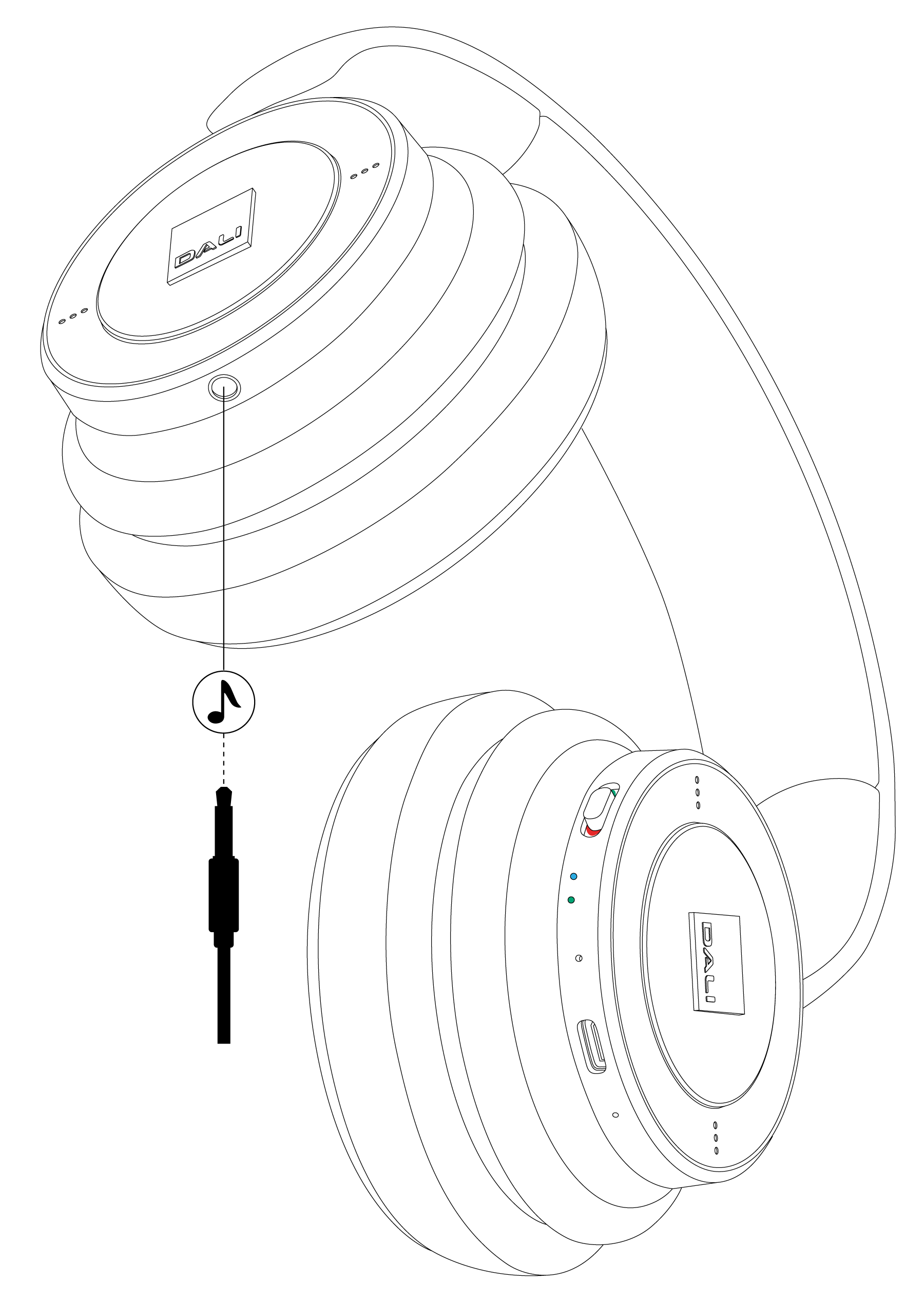
You can use a mini-jack cable to connect your IO headphones to a device with a conventional headphone output.
- Simply connect the supplied cable to the socket in the left headphone cup and to the source device’s headphone socket.
Your IO headphones don’t need to be switched on to play audio via a mini-jack cable connection so they can be used in this passive mode even if their battery is exhausted, however for optimum sound quality they are always best used in active mode.
Note
IO-6 noise cancelling will not function, and headphone audio quality may be slightly diminished when the headphones are used in passive mode.
If your headphones are playing audio via a Bluetooth or USB connection when a mini-jack plug is inserted, the mini-jack connection will take priority.
USB Connections
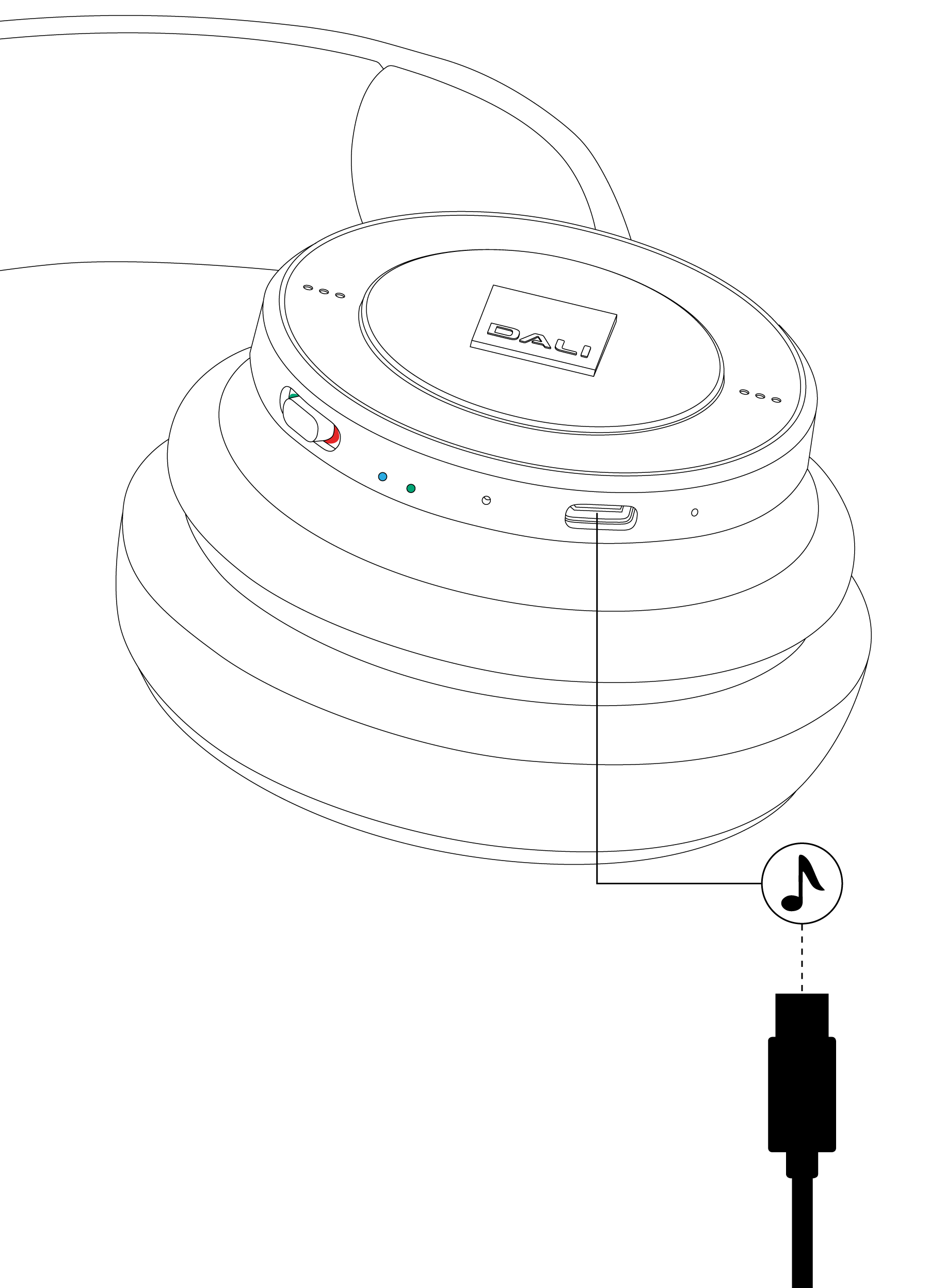
You can play audio on your IO headphones via a USB connection to a laptop or desktop computer.
- Simply connect an appropriate USB cable to the socket on the right headphone cup and to a computer USB socket.
The headphones will become available to the computer as a USB audio output device.
Note
If the computer USB socket incorporates an appropriate power supply, the headphone battery will charge while connected.
Mini-jack and Bluetooth audio have priority over USB audio. USB audio will mute when a headphone Mini-jack connection is made or Bluetooth audio is played.
Controlling Your DALI IO Headphones
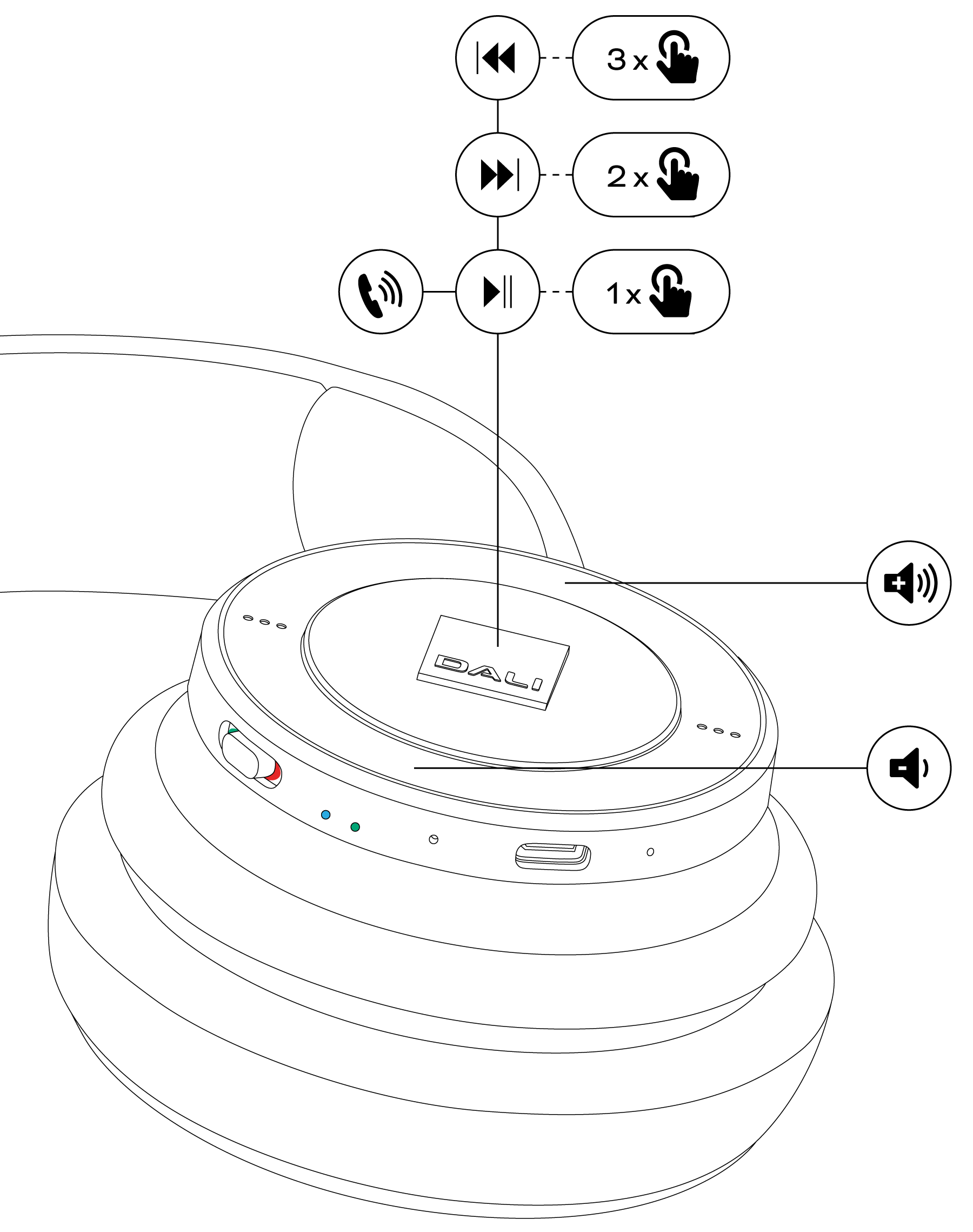
When your headphones are connected to an audio device via Bluetooth you can control audio playback via a button built into the centre panel of the right headphone cup. If the Bluetooth audio device is a smartphone, the button can also be used to answer and end phone calls.
- Press the button once to play or pause audio, or to take or end a phone call.
- Press the button twice in quick succession to skip audio playback to the next track.
- Press the button three times in quick succession to skip audio playback to the previous track.
- Press and hold the button to engage a smartphone virtual assistant (Siri, Google Assistant for example). Press the button once to disengage the virtual assistant.
Headphone volume for Bluetooth and USB audio sources is controlled via buttons built into the outer ring of the right headphone cup.
- Press the upper side of the outer ring to increase headphone volume.
- Press the lower side of the outer ring to decrease headphone volume.
Note
Play/pause, next and previous control is not supported via a USB connection.
Noise Cancelling (IO-6 only)
IO-6 headphones incorporate active noise cancelling technology (ANC) that can significantly reduce the disturbance of ambient noises – for example, general city noise and aircraft cabin noise.
IO-6 noise cancelling technology also incorporates a transparency option that enables ambient sounds to pass through the headphones unimpeded. Transparency can enable you to hear conversations or important ambient sounds without the need to remove your headphones.
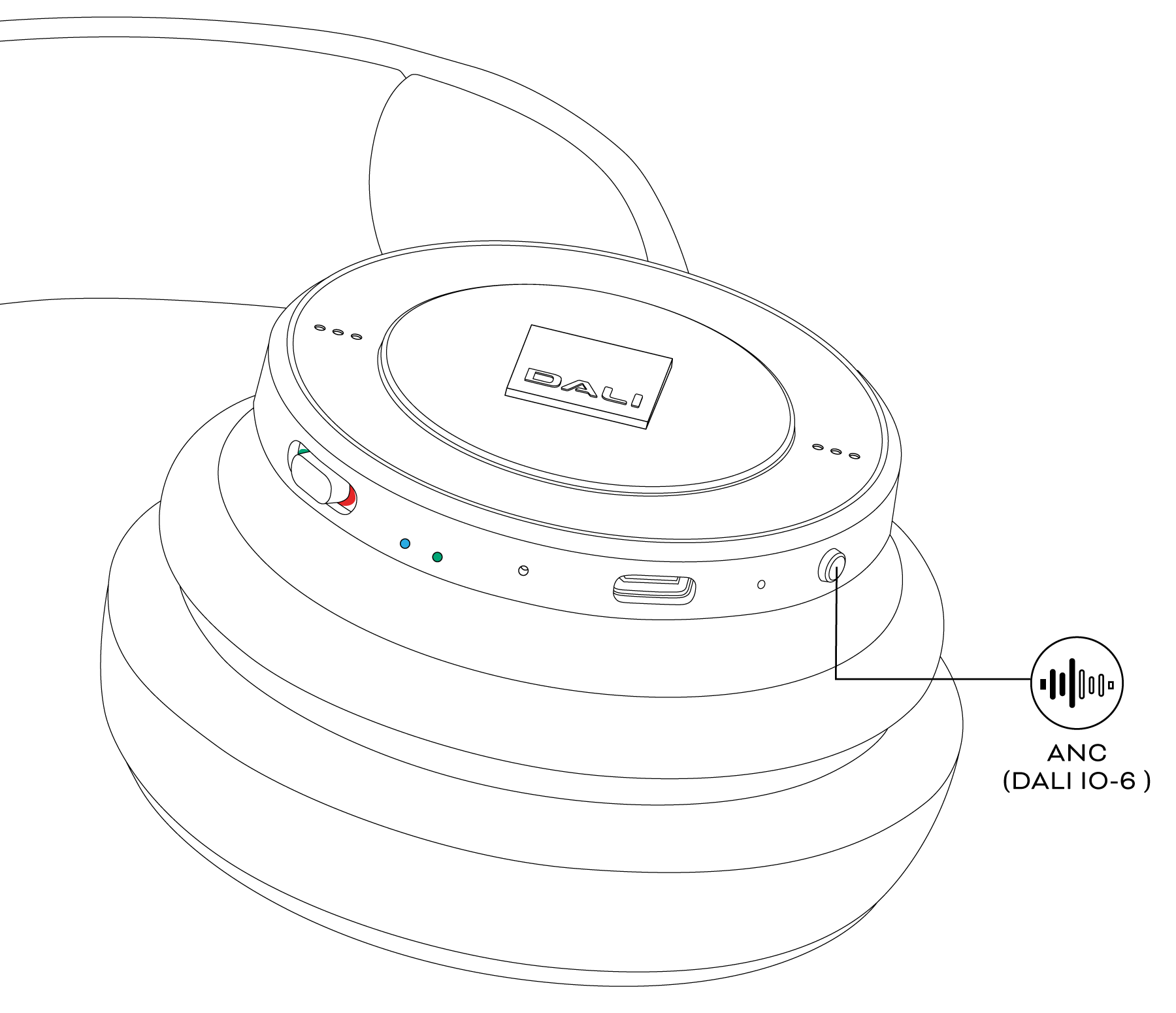
Noise cancelling is controlled from a push button on the edge of the right headphone cup.
- Press the button once to engage full noise cancelling and a second time to select the transparency option.
- Press the button once again to disengage noise cancelling and transparency.
Maintenance
Ear Pads
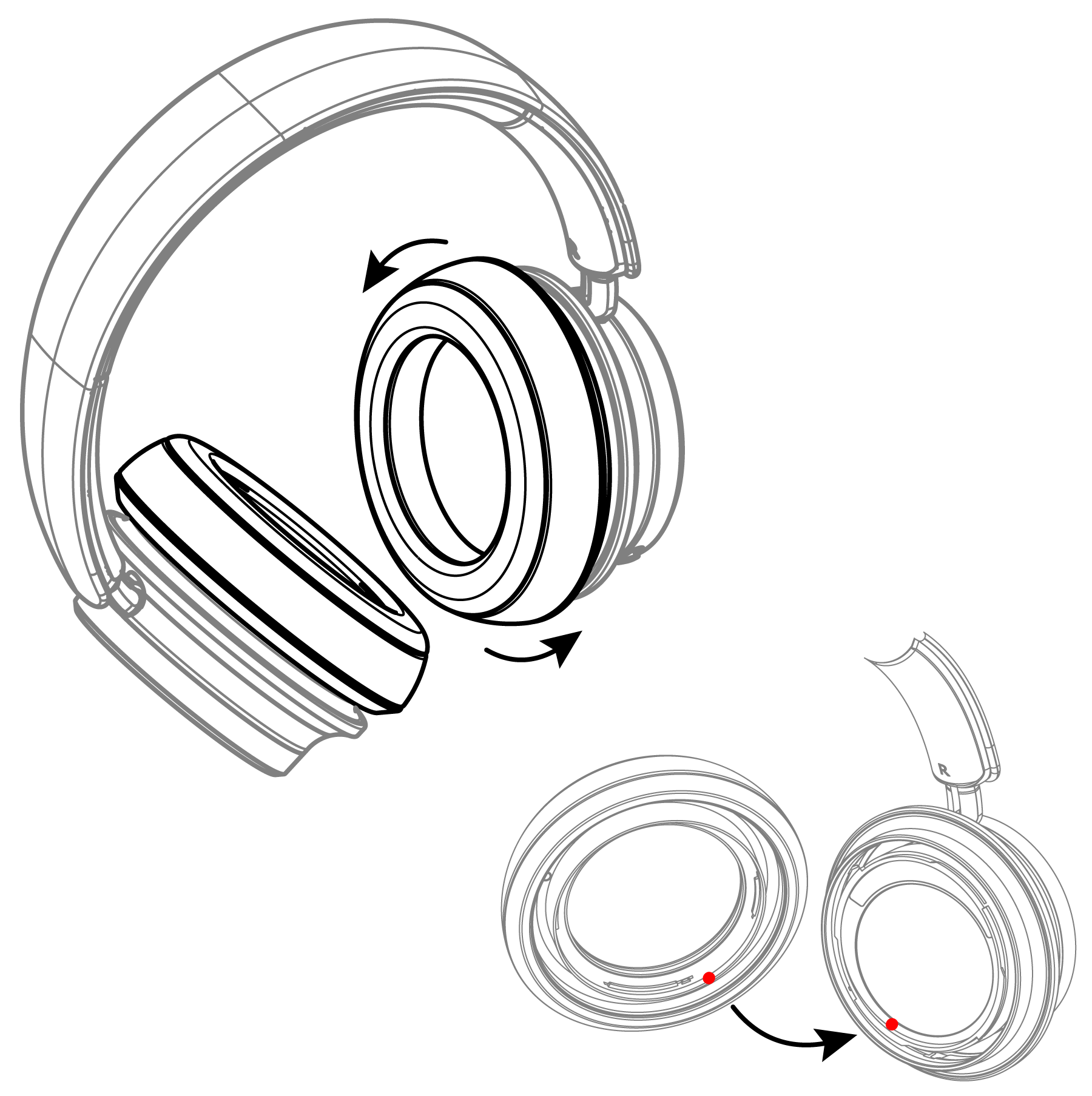
IO headphone ear pads can be removed for cleaning or replacement. The ear pads attach via a bayonet fitting.
- To remove an ear pad, simply turn it anti-clockwise and lift it away from the headphone cup.
Replacement ear pads can be ordered through your local DALI retailer or distributor, or directly from DALI at www.dali-speakers.com
Twist the ear pad anti-clockwise to remove it.
Use markings on ear pad and housing to align ear pad correctly.
Cleaning
If your headphones need cleaning, wipe their surfaces with a soft, lint-free cloth. A slightly damp cloth may be used for stubborn marks, but it is important that your headphones do not get wet. The use of abrasive or solvent based cleaning fluids is not recommended.
Note
When replacing ear pads ensure that they are rotated fully clockwise and click twice into position. Incorrectly fitted ear pads will impact on headphone bass reproduction and noise cancelling performance.
Restart and Reset
If at any time your headphones behave erratically they may need to be restarted or, in some cases, reset to their factory configuration.
- To return your headphones to their factory configuration, press and hold both the volume up and down buttons while at the same time sliding the power switch to its Bluetooth pairing position while the headphones are switched on.
The headphones will restart in factory (unused) condition with no Bluetooth devices memorised. - To restart your headphones, use a small pin, (e.g. a paper clip) to press and hold the reset button located on the right ear cup for two seconds while the headphones are switched on.
The headphones will retain their Bluetooth device memory when they restart.

Note
If you have any questions concerning the operation or performance of your headphones you can contact DALI support at: https://dali-speakers.com
Technical Specifications
| Model | IO-4 | IO-6 |
|---|---|---|
| Headphone principle | Closed back circumaural (over ear) | Closed back circumaural (over ear) |
| Full Range Driver | 50 mm free edge paper fibre cone | 50 mm free edge paper fibre cone |
| Connection input(s) | Bluetooth (wireless) | Bluetooth (wireless) |
| ctd. | 3.5 mm Mini Jack stereo | 3.5 mm Mini Jack stereo |
| ctd. | USB-C | USB-C |
| Wireless inputs | Bluetooth 5.0 | Bluetooth 5.0 |
| ctd. | AAC | AAC |
| ctd. | aptX | aptX |
| ctd. | aptX HD | aptX HD |
| Functions | Power ON/OFF | Power ON/OFF |
| ctd. | Bluetooth Pair/ Release | Bluetooth Pair/ Release |
| ctd. | Volume up/down | Volume up/down |
| ctd. | Play/pause/skip track | Play/pause/skip track |
| ctd. | Take call | Take call |
| ctd. | ANC mode (ON/Transparency/OFF) | |
| Noise reduction | N/A | Active Noise Cancellation (ANC) |
| Hands-free calls and voice assist | Clear Voice Communication (CVC) | Clear Voice Communication (CVC) |
| Battery life | Up to 60 Hrs | Up to 30 Hrs |
| Accessories included | USB-C cable | USB-C cable |
| ctd. | 3.5 mm stereo cable | 3.5 mm stereo cable |
| ctd. | String Bag | Flight adaptor |
| ctd. | Travel case | |
| Finish | Iron Black | Iron Black |
| ctd. | Caramel White | Caramel White |
| Replaceable ear pads | Yes | Yes |
| Weight [g] | 320 | 325 |
| Compact storage | One-way foldable | One-way foldable |
| IP Rating | IP53 | IP53 |
| Frequency Range (±3 dB) [Hz] | 10 Hz - 20 kHz | 10 Hz - 20 kHz |
| Max SPL [dBA] BT/ USB full scale | 100 | 100 |
| Analogue Input sensitivity for 94 dB SPL @ 500 Hz (Passive mode/ Active mode) [mV rms] | 200 / 175 | 200 / 175 |
| Impedance (Passive mode) [Ω] | 25 | 25 |
All technical specifications are subject to change without notice.