Astral Destiny
An Octal Octave Reverberation Odyssey
G’day mam! We’d like to take this opportunity to welcome you and your instrument of choice to a vast new world of octave reverberation. Unrelenting, radicalized reverb for the modern world; an array of haunting, unearthly delights and ethereal sonic sorcery designed to take you on a deep journey through both time and space. This is your new destiny should you choose to accept it (which we assume you have if you’ve gotten this far…). Anyhow, welcome to your new Astral Destiny.
The Astral Destiny is a compact and powerful modulated octave reverb pedal that features 8 reverb modes with 8 editable presets, assignable expression control, tails for natural reverb decay when the effect is bypassed and a super cool stretch feature that doubles the length of the reverb while adding an adjustable pitch bending effect.
Each Astral Destiny is built one at a time by a team of Los Angeles-based robots and a handful of real life humans in the occupied Erie territory presently known as Akron, Ohio.
Reverb Modes
- Abyss: Huge reverb with no octave effect
- Shimmer: Adds an upper octave to the reverb tail
- Sub: Adds a lower octave to the reverb tail
- Sub Shimmer: Adds an upper and lower octave to the reverb tail
- Astral: Adds an upper and lower octave combined with a regenerating tail
- Ascend: Upward pitch bending; best used on sustained notes and chords
- Descend: Downward pitch bending; best used on sustained notes and chords
- Cosmos: Adds a regenerating fifth to the reverb tail; best used on sustained notes and chords
Controls
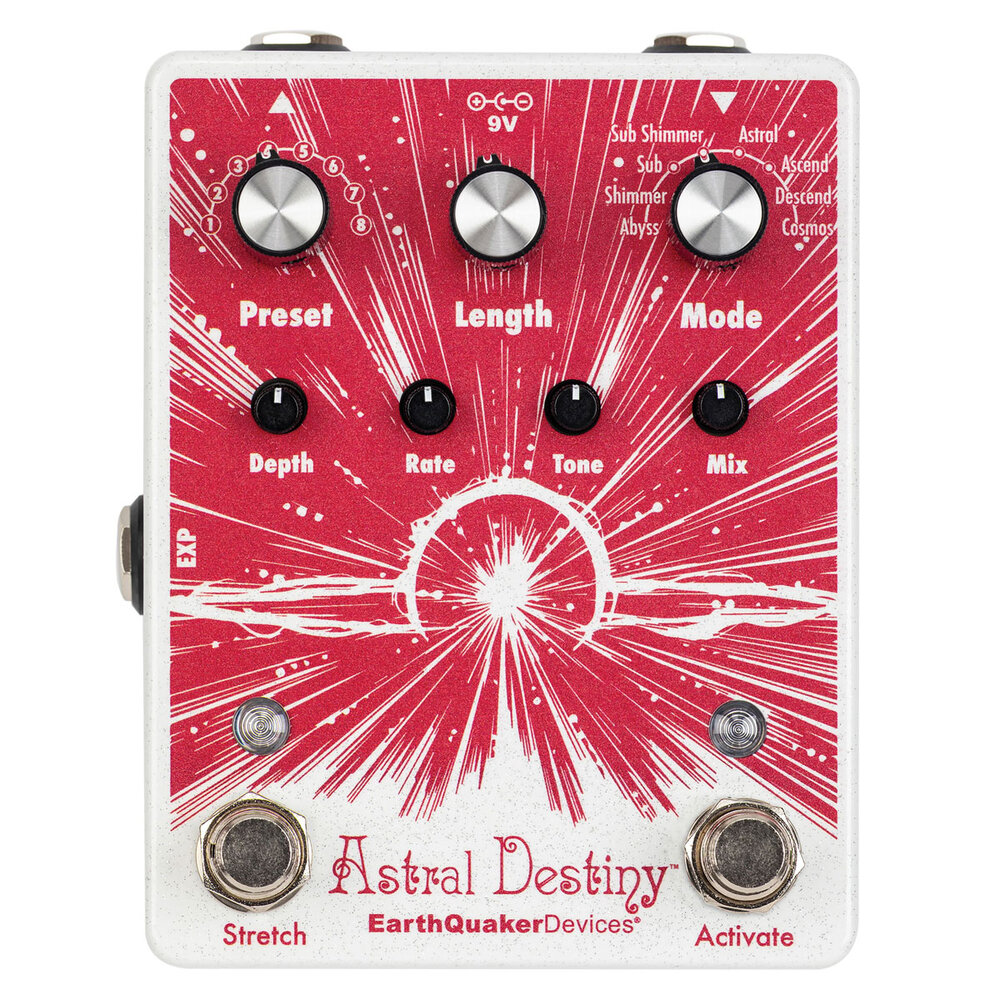
Preset: 8 position rotary switch to recall presets. Astral Destiny ships with 8 presets which can be edited or overwritten.
Length: Controls the length of the reverb decay.
Mode: 8 position rotary switch to select the reverb mode.
Depth: Adjusts the intensity of the chorus effect.
Rate: Adjusts the rate of the chorus effect.
Tone: Boosts treble clockwise, cuts treble counterclockwise. Center is a flat frequency response.
Mix: Level control for the reverb effect.
Activate Footswitch: You are probably gonna need this to activate and deactivate the reverb effect.
Stretch Footswitch: Doubles the length of the reverb effect while adding a temporary change in pitch.
Tails or Full Bypass Switching
Astral Destiny can operate in two different bypass states: Tails or Full Bypass. It comes factory set in Tails Mode which allows the reverb effect to naturally decay after the effect is bypassed and is indicated by a green Activate LED. Full Bypass will cut the reverb effect completely when the effect is bypassed and is indicated by a red Activate LED.
To select Full Bypass operation, follow these steps:
- Unplug the power cable.
- Hold down the Activate footswitch.
- Insert the power cable.
- Wait for the Activate LED to flash 3 times and then release the footswitch.
- Astral Destiny will now be in Full Bypass Mode every time it is powered on and the Activate LED will be Red.
Follow the same steps to return to Tails Mode and the Activate LED will be green.
Astral Destiny is buffered bypass which means that there will always be an active buffer present and it requires power to pass signal.
Most EarthQuaker Devices brand effect pedals feature Flexi-Switch® Technology. The Astral Destiny is not a Flexi-Switch® enabled device. Holding the Activate footswitch does not enable momentary control. Instead, holding the Activate footswitch for more than 2 seconds will toggle between Live and Preset Modes. See the “Presets” section for more information.
Stretch Footswitch
The Stretch footswitch doubles the length of the reverb effect while adding a temporary change in pitch.
- Tap the Stretch footswitch for an immediate pitch change.
- Hold the Stretch footswitch for a temporary pitch bending effect.
Adjusting the speed of the pitch bend
The speed of the of the pitch bending effect created by holding the Stretch footswitch can be adjusted by following these steps:
- Hold down the Stretch footswitch.
- Turn the Length control clockwise for a longer pitch bend or counterclockwise for a shorter pitch bend.
- Release the Stretch footswitch once you have selected your desired length.
- The Stretch footswitch will now operate at the selected speed every time the Astral Destiny is powered on.
Astral Destiny is factory programmed with the pitch bending speed set in the center.
Expression Jack
Use any TRS expression pedal to take control over the Length, Depth, Rate, Tone, or Mix panel controls!
EXP Assignment
The Astral Destiny ships with expression mapped to the Depth control but it can also be mapped to the Length, Rate, Tone, or Mix. Follow these steps to reassign the EXP functionality:
- Insert the expression pedal plug into the EXP jack.
- Place the expression pedal in the toe down position and leave it there.
- Turn the panel control on the Astral Destiny you wish to assign to EXP jack then put the expression pedal in the heel down position.
- This control is now assigned to the expression pedal.
Leave the expression pedal plugged in and repeat steps 2 - 4 to reassign the EXP jack to another control at any time.
If you turn the panel control that is assigned to the EXP jack while the expression pedal is plugged in, the panel control will override the expression pedal setting. The expression pedal will reassume control the next time it is used.
Different EXP assignments can be saved in each preset.
You can also use Control Voltage with the EXP Jack. The CV range is 0 – 3.3v.
EXP Jack Internal Connections:
Sleeve= Ground
Ring= 3.3V
Tip= Wiper (CV)
Presets
The Astral Destiny operates between two different modes: Live or Preset. It comes with 8 factory presets, 1 for each reverb mode, that can be edited or completely overwritten for your enjoyment. The settings for Length, Depth, Rate, Tone, Mix as well as EXP assignment and Stretch length can all be stored and recalled. Any of the Astral Destiny’s 8 reverb modes can be used as the basis for each of the 8 presets.
Live Mode
This is the standard mode of operation that the Astral Destiny ships in and is indicated by a Green or Red Activate LED depending on the bypass state. Astral Destiny will operate manually in this mode and all controls will visually indicate the current settings.
Preset Mode
Activating Preset Mode puts the Astral Destiny into one of the 8 presets selected by the Preset rotary switch. This mode is indicated by a Yellow Activate LED. The panel controls will no longer operate as visually set and instead, the Astral Destiny will use the stored control settings for each selected preset position. If a control change is made while in Preset Mode, the Activate LED will begin to flash. You can easily save this change by holding down both footswitches until both LEDs flash 4 times indicating that the change has been saved.
Presets can be stored and overwritten in both Live and Preset Modes. To edit an existing preset, you must first be in Preset Mode before making the desired changes.
There is no undo for preset saving, so make sure you are not overwriting your favorite sound, especially when you are saving presets from Live Mode!
Access a Preset
- Turn the Preset rotary switch to the desired selection.
- Hold down the Activate footswitch for 2 seconds.
- The Activate LED will turn Yellow indicating you are now in Preset Mode.
- Once in Preset Mode, you can turn the Preset rotary switch to access any of the 8 stored presets.
Save a Preset
- In either Live or Preset Mode, turn the Preset rotary switch to the desired location you wish to save your preset.
- Dial in the settings you want to save. EXP assignment and Stretch length can also be saved!
- Hold down both footswitches until both LEDs flash 4 times and then release.
- Your preset is now saved!
Edit/Overwrite a Preset
- Once in Preset Mode, make the desired changes to any of the controls in the selected preset. Any controls that have not been changed will remain as previously saved.
- The Activate LED will flash Yellow indicating a change has been made to the stored preset.
- Hold down both footswitches until both LEDs flash 4 times and then release.
- The Activate LED will return to static Yellow and the previous preset has been overwritten.
Return to Live Mode
- While in Preset Mode, hold down the Activate Footswitch for 2 seconds.
- The Activate LED will flash then return to the color selected by the bypass state indicating you are now in Live Mode.
- Once in Live Mode, the Astral Destiny will return to where the panel controls are set.
Factory Reset
If you would like to erase all of your saved settings and presets and return the Astral Destiny back to its natural factory shipped state, you can do a Factory Reset. Please keep in mind that once the pedal has been reset, you will erase all of your saved information and it can no longer be recalled.
If you would like to return the Astral Destiny to the factory settings, follow these steps:
- Unplug the power cable.
- Hold down both footswitches.
- Insert the power cable.
- Both LEDs will flash 3 times then release both footswitches.
- Your Astral Destiny has now returned to the factory settings.
Power Requirements
- Current Draw: 85 mA
- This device takes a standard 9 volt DC power supply with a 2.1mm negative center barrel. We always recommend pedal-specific, transformer-isolated wall-wart power supplies or multiple isolated-output supplies. Pedals will make extra noise if there is ripple or unclean power. Switching-type power supplies, daisy chains and non-pedal specific power supplies do not filter dirty power as well and let through unwanted noise.
DO NOT RUN AT HIGHER VOLTAGES!
Tech Specs
Input Impedance: 500 kΩ
Output Impedance: 100 Ω
Warranty
This device has a limited lifetime warranty. If it breaks, we will fix it. Should you encounter any issues, please visit www.earthquakerdevices.com/warranty.