Pyramids
You hold in your hands the instruction manual for the EarthQuaker Devices® Pyramids™ Flanger. Well, a reproduction, actually. The original dates to 138 BC and lives behind layers of bulletproof glass in the Ark of the Covenant Jamie Stillman keeps in his basement. Pyramids is built upon the same proprietary DSP architecture as the Avalanche Run, only this time it’s way flangier.
Pyramids is a stereo flanging Device with five presets, eight flanger modes, tap tempo, tap subdivision via the Rate & Tap mini-toggle, a multifunction Modify control, positive and negative Feedback, and a variable Mix control, which is something you don’t see on a flanger every day.
Controls
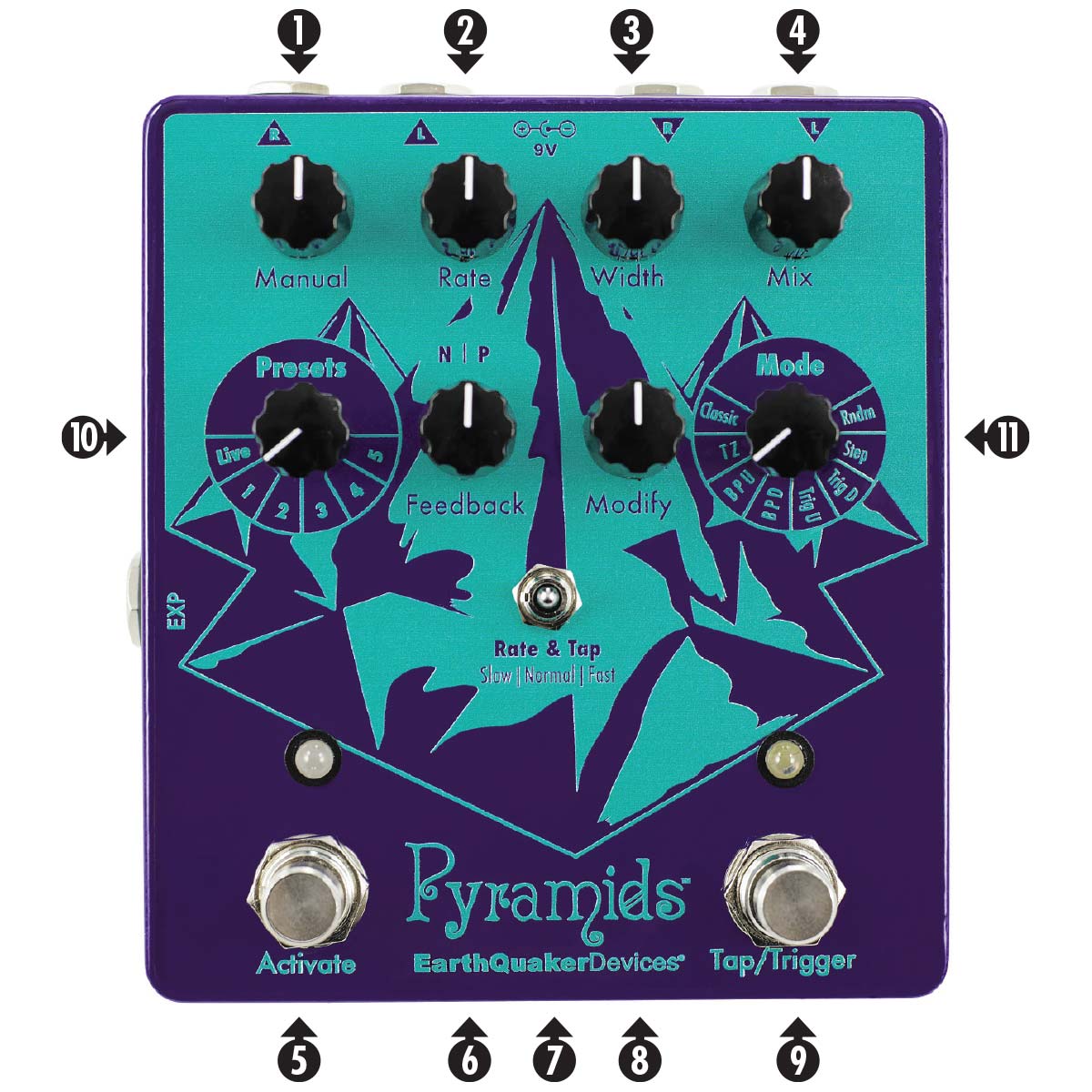
Pyramids has six knobs, three switches, two footswitches, and five jacks.
The knobs are Manual, Rate, Width, Mix, Feedback, and Modify. We’re going to tell you what they do more than once, because while they generally affect similar parameters, they react differently in each mode, so please pay attention. There will be a test.
Manual: Controls the delay time of the modulated signal. Turn it clockwise for a shorter delay time and a higher-pitched flange sound. Turn it counter clockwise for longer delay times and a lower-pitched flange sound. This parameter may be controlled by an expression pedal. When using an expression pedal, the Manual control is defeated.
Rate: Controls the speed of the LFO as well as the rise time in “Trigger Up” mode and fall time in “Trigger Down” mode. Turn it up for faster modulation or turn it down for slower modulation. The Rate control has three ranges of operation: Slow, Normal and Fast. These modes are selected by the Rate & Tap toggle switch.
Width: Controls the frequency range of the LFO sweep. You might also think of it as a depth control for the LFO.
Mix: This is the volume control for the modulated signal. The modulated signal gets louder when you turn it clockwise and quieter when you turn it counterclockwise.
Activate Footswitch: The activate switch features our Flexi-Switch™ technology! This relay-based true-bypass switch allows for momentary or latching operation.
For standard latching operation, tap the footswitch once to activate the effect and tap again to bypass.
For momentary operation, hold down the footswitch for as long as you’d like to use the effect. Release to bypass.
Feedback: Regeneration control for the modulated signal. There is a center-detent for zero feedback. Increasing this control from noon introduces positive feedback for a lush “whooshing” sound. Decreasing this control from noon produces negative feedback, which has a hollowed-out tubular sound.
Rate & Tap Toggle Switch: “Normal” (center position) is 1:1. The tempo you tap in is the tempo Pyramids will spit out. When set to “Slow” (left position), the tempo you tap is divided for a slower sweep. When set to “Fast” (right position), the tempo you tap is multiplied and delivers a faster sweep.
Modify: The behavior of this control depends upon which mode you’re using.
- Classic: Tone control for the modulated signal. Clockwise from center is a high pass filter. That means it cuts the low end and allows the high frequencies to pass through. Counterclockwise from center is a low pass filter. That means it cuts the high end and allows bass frequencies to pass through.
- Through-Zero: Delay time for the unmodulated dry signal. This controls where in the LFO cycle the through-zero point occurs, which is where you’ll hear the most drastic cancellation. Clockwise Modify settings lower the frequency of the cancellation. Counterclockwise Modify settings produce higher frequency cancellation. This is probably backwards from what you’d expect, but let’s roll with it.
- Barber Pole Up: Tone control for the modulated signal. Clockwise from center is a high pass filter. Counterclockwise from center is a low pass filter.
- Barber Pole Down: Tone control for the modulated signal. Clockwise from center is a high pass filter. Counterclockwise from center is a low pass filter.
- Trigger Up: Sensitivity control for the sweep. This controls how quickly the re-triggering reacts to your pick attack. Clockwise is higher sensitivity, counterclockwise is lower sensitivity.
- Trigger Down: Sensitivity control for the sweep. This controls how quickly the re-triggering reacts to your pick attack. Clockwise is higher sensitivity, counterclockwise is lower sensitivity.
- Step: Adjusts the glide between steps. Low Modify settings produce sharp, stair-stepped transitions between steps. Higher Modify settings introduce a smoother glissando effect.
- Random: Adjusts the glide between steps. Low Modify settings produce sharp, stair-stepped transitions between steps. Higher Modify settings introduce a smoother glissando effect.
Tap / Trigger Footswitch: In Classic, Through-Zero, Barber Pole Up, Barber Pole Down, Step, and Random modes, this footswitch is a tap tempo control. In Trigger Up and Trigger Down modes, this footswitch triggers the effect whenever it is pressed.
Presets Rotary Switch: Selects between Live mode and one of five presets. Pyramids comes with our favorites programmed in, but you’re allowed to re-write them if you want. We don’t mind. Setting this switch to Live will give you the sound which corresponds to Pyramids’ current setting.
Mode Rotary Switch: Selects between Pyramids’ eight flanger modes (see the following Modes section.)
Modes
Classic
Pyramids’ Classic Mode delivers the “classic” jet-plane liquid-silk flanging sound we all know and love and have come to expect from any reputable flanging Device. Try this mode to recreate the sounds of old-school ADT (Automatic Double Tracking) effects as heard on records by those lovable mop-tops from England (you know which ones) and on the most ripping riffs to come from the NWOBHM.
Through-Zero
Try this one in stereo. In Through-Zero Mode, Pyramids gives you authentic tape-style flanging without all the calibration, biasing, demagnetizing of heads, and so on that a real tape machine - two of ’em, actually - requires.
In ye olden days of real tape flanging, one tape was played straight through on one machine, while on another machine, a tape containing a copy of the guitar track played simultaneously as the recording engineer pressed down on the flange (tape reel) of the second machine, causing the second signal to vary in tempo and pitch. When the two signals are combined, the result is a psychedelic comb-filtering effect that sounds like a black hole collapsing on itself while the rest of the stars in the galaxy go supernova in unison.
Savvy recording engineers discovered that if they introduced a delay on the dry signal by doing the exact same thing - pressing down on the flange of the other tape machine - they could achieve intensified, swirly, and dramatic cancellation as the two signals being flanged at different speeds nearly disappear at what’s called the “zero-point,” hence the term Through-Zero flanging.
We don’t recommend Through-Zero flanging and driving, as the resulting sound is quite disorienting and may impair your ability to operate heavy machinery. But it’s probably okay for playing heavy metal. And if you’re going to Djent, please Djent responsibly.
In Through-Zero Mode, the Modify control adjusts the delay of the dry signal and Manual controls the delay time of the wet signal. Experiment with these controls in unison to dial in the sweet spot for the dropout!
Barber Pole Up
“Barber Pole” flanging refers to an infinitely sweeping upward flange with no beginning, middle, or end. This, depending on your point of view, sounds either like Ms. Poppins taking flight with her umbrella, or a nightmarish, Kafkaesque hellscape where time is meaningless and we spend the rest of our natural lives staring into the void, forever dwellers on the threshold.
Barber Pole Down
Barber Pole Down is exactly like Barber Pole Up, except the flanging effect goes downward in pitch, rather than upward.
Trigger Up
Trigger Up Mode is similar to Barber Pole Up mode, minus the existential dread. The flanger still produces a continuous upwards sweep; except in this mode, your pick attack (or pressing the Tap/Trigger Switch) re-triggers the flange from the beginning. It’s like getting a fresh start with every note! In Trigger Up mode, the Rate control adjusts how quickly the sweep reaches the top and Modify acts as a sensitivity control for the re-triggering effect.
Trigger Down
Trigger Down is exactly the same as Trigger Up, only the flanger sweeps downward. Cool, huh?
Pro Tip
In Trigger Up/Down modes, you may re-trigger the flanger using an external source in what we call Side Chain Flanging.
To trigger Pyramids using an external source, plug your primary instrument (the signal on which you want to hear the flanger) into the Right Input and connect Pyramids’ Right Output to your amplifier or DAW.
Connect the external trigger source (drum machine, sequencer, or CV) to Pyramids’ Left Input.
To hear only the affected primary instrument signal (as modulated by the external trigger source), do not connect the Left Output. Your primary instrument’s signal will pass through Pyramids’ Right Input / Output, but the flanger will react to changes in the external trigger signal instead of your primary instrument. To monitor the trigger source, connect Pyramids’ Left Output to a separate amplifier or DAW input.
Step
Step mode tries to restore order to the universe by sweeping up and down in stepped increments, kind of like the sequencer on a synthesizer. In Step mode, the Modify control adjusts the glide between steps. Low Modify settings produce sharp, stair-stepped transitions between steps. Higher Modify settings introduce a smoother glissando effect.
Random
Random mode is like Step mode, except the sweep is randomized without reason or rhyme. Some men just want to watch the world burn.
Presets
Pyramids ships with five example factory presets:
1: Classic
2: Barber Pole Up
3: Trigger Up
4: Step
5: Random
These are intended to get you started and are by no means the be-all-end-all examples of these modes. Please feel free to modify or overwrite these as you’d like!
To Modify an Existing Preset
Turn the Preset Rotary Switch to the preset you wish to change.
Adjust the controls to your desired settings. When a control has been changed, the Activate LED will turn from yellow to red to indicate a change is being made. The red LED is a warning that a preset is being edited. Any changes made at this point will be lost unless the preset is saved.
To save your changes, press and release both the Activate Footswitch and the Tap/Trigger Footswitch at the same time. The Activate LED will then flash yellow. Once the LED is yellow, your modified preset is saved!
To Write Your Own Preset
Adjust the controls to your desired settings.
Press and hold the Activate Footswitch.
While holding the Activate Footswitch, press and hold the Tap/Trigger Footswitch.
While holding down both footswitches, turn the Preset Rotary Switch to the desired preset location (1-5) and release both footswitches.
The Activate LED will flash and then turn yellow.
Once the Activate LED turns yellow, your preset is saved!
To Restore Factory Presets
Turn the Preset Rotary Switch to the Live position.
Unplug Pyramids’ power supply from the power jack.
Press and hold both the Activate Footswitch and the Tap/Trigger Footswitch.
Insert the power plug into Pyramids’ power jack.
Release both footswitches.
Voila! Your Pyramids sounds as fresh as the day it left the factory.
Inputs & Outputs
To Use Pyramids in Mono
Plug your instrument into the Left Input and use either the Left Output or the Right Output.
To Use Pyramids with a Mono Input and Stereo Output
Plug your instrument into the Left Input and connect both the Left Output and Right Output to the next stereo pedal in your chain, to two inputs of your DAW, or to two amplifiers.
To Use Pyramids with a Stereo Input and Stereo Output
Plug your stereo instrument into the Left Input and Right Input and connect both the Left Output and Right Output to the next stereo pedal in your chain, to two inputs of your DAW, or to two amplifiers. Pyramids is true stereo and will pan across the stereo field.
To Use Pyramids with Two Mono Sources
Plug one instrument into the Left Input and connect the Left Output to the next pedal in your chain, to a DAW input, or to an amplifier. Then, plug another instrument into the Right Input and connect the Right Output to the next pedal in a separate effects chain, to a separate DAW input, or to a separate amplifier. I have no idea why anyone would want to do this, but it’ll work.
LED Behavior
In Live mode, the Activate LED is always green. When using a saved preset, the Activate LED is yellow, and will change to red when a preset setting is changed. When saving a change to a preset or writing an entirely new preset, the Activate LED will flash and turn yellow once the change/preset has been saved. The Tap/Trigger LED is white and will flash in tempo regardless if the tempo is set via the Rate control or the Tap/Trigger Footswitch. The Tap/Trigger LED is not used in both Trigger up and down modes and will remain dark.
Power Requirements
Current Draw: 460 mA
For best results, please use the included 9v center-negative 1-amp DC power supply.
To use with multiple output transformer-balanced isolated pedal-specific power supplies, Pyramids’ may be powered from two outlets combined using a current-doubling cable. DO NOT USE A VOLTAGE-DOUBLING CABLE BECAUSE THAT WILL SEND 18V TO PYRAMIDS AND FRY IT LIKE AN OVEREASY EGG AT A GREAZY SPOON DINER.
Tech Specs
24-bit 96 kHz A/D & D/A converters
S/N Ratio: 115 dB typical
Input Impedance: 1 MΩ
Output Impedance: 100 Ω
All analog dry signal path
All digital wet signal path with 20 Hz to 20 kHz frequency response
PCBs populated by a combination of artificial and human intelligence in the Akron, Ohio of America.
Each and every Pyramids is completely assembled, wired, and tested by total human beans in the Great Sphinx of Akron, Ohio, which, coincidentally, looks exactly like the cover of Iron Maiden’s Powerslave.
Warranty
This device has a limited lifetime warranty. If it breaks, we will fix it. Should you encounter any issues, please visit www.earthquakerdevices.com/warranty.