Time Shadows II
Subharmonic Multi-Delay Resonator
The latest EarthQuaker Device actually is the same as the latest Death By Audio device. This new pedal is a joint collaboration that brings their sonic soundscape trips to your melted mind. With the EQD/DBA switch to the left Time Shadow’s controls are completely the brainchild of EarthQuaker Devices resident genius Jamie Stillman. Flip the switch to the right, and you enter the head of the madman Oliver Ackermann from Death By Audio barely clutching to reality. Place the EQD/DBA switch in the middle and enter a whole new realm of pitch-warping delays brought to you by a telepathic mind-meld with a 5th dimensional dream being.
All three sounds are wildly different from each other and yet share a perfectly designed harmony to be completely complementary and suitable for every style and genre of music. The EarthQuaker Devices side transforms whatever you play into the sound of a jazz space bazooka! It’s a pitch-morphed fuzz delay filter with so much attitude that you are actually intimidated. It takes the input signal, blows it out with the power of digital distortion, blends it with a polyphonic sub octave, feeds it into a delay, then spits it out into a highly resonant envelope controlled lowpass filter. The Death By Audio side is a multi-delay filter remorphinator that goes from icy shimmers to cosmic space caves of bouncing repeats. The middle position is an energy beam that brings your earthly transmissions repetitively closer to the heavens while simultaneously diving deep into the hells.
In addition to all this madness we also bring you a user-assignable expression jack and 6 preset slots to save and recall your favorite settings! With these three unearthly delights, you should have everything you need to break brains and destroy monotony! Each Time Shadows is lovingly built by druids with very soft hands in the tiny hobbit hole of Akron, Ohio.
Controls
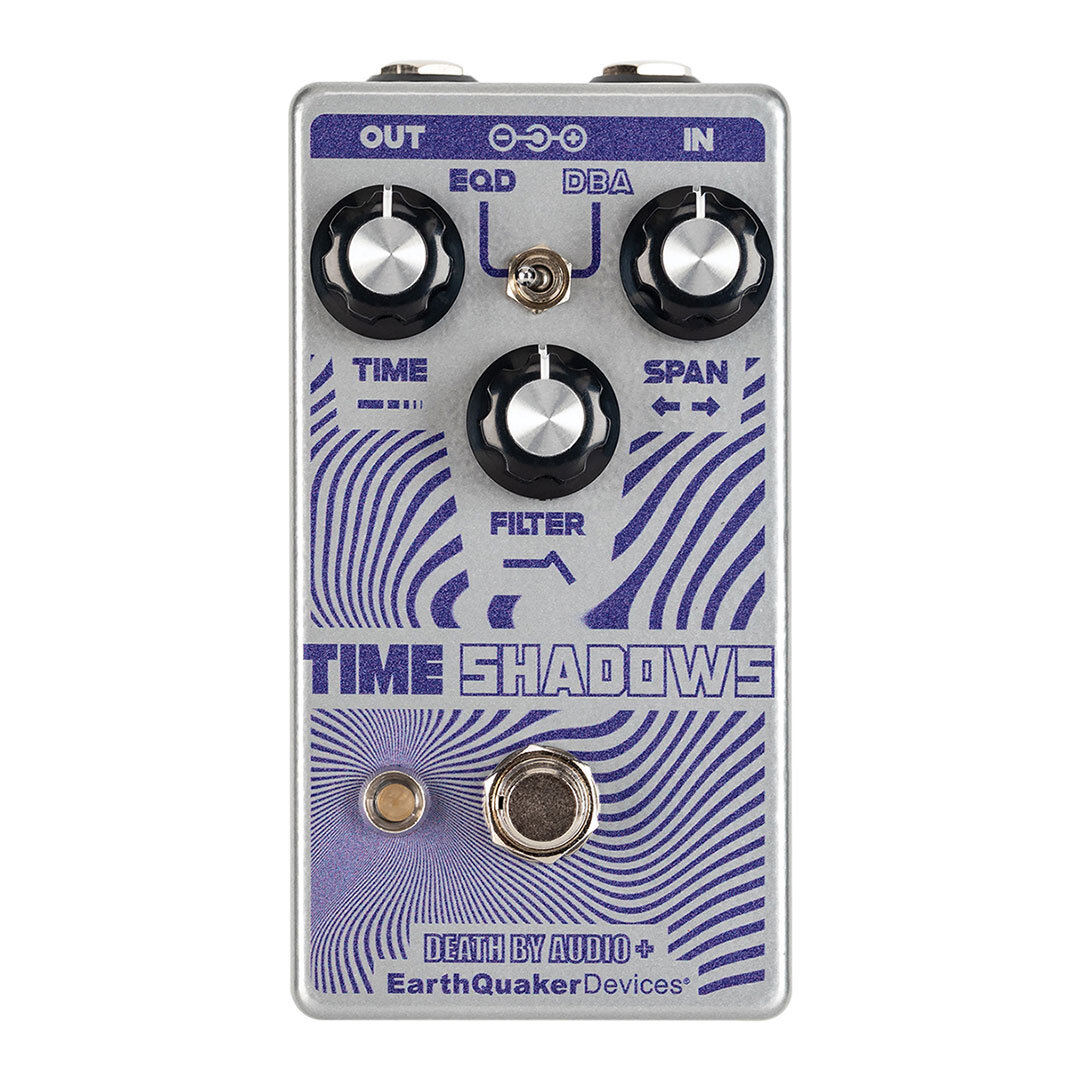
All three modes share the same simple controls: Time, Span and Filter. While they control the same parameters, you’ll get wildly different results in each mode.
Time: Controls the delay time.
Span: Controls the intensity of repletion.
Filter: Arguably the most fun control on Time Shadows! On the EQD side this controls an envelope for the filter frequency and a gate for the cutoff to the input of the delay. On the DBA side this controls the filter frequency as well as the shift point of a precisely phased delay line for pole zero interpolation. In the magic middle position, this controls the mix.
Pro Tips
- Since there is an envelope component to this effect, the input level will play a role in frequency response.
- Some of the most fun to be had is with short delay
Timeand highSpansettings while manipulating theFiltercontrol.
Global Features
Time Shadows has two operating modes which are indicated by the color of the Save/Recall switch.
Green = Live Mode
The pedal will operate exactly where the controls are set, and any changes will have no effect on the presets unless saved. The Save/Recall switch will stay static green.
Red = Preset Mode
Time Shadows will operate in a stored preset mode which is selected by the Preset switch and the physical settings of the controls will be ignored. The Save/Recall switch will stay static red.
Time Shadows comes factory set to start up in Live Mode.
Presets
Time Shadows has six available preset slots for you to save and recall your favorite settings. The settings for each of the three controls, the mode switch and the expression jack assignment can be saved and recalled in any of the slots.
Saving a preset
- Turn the
Presetrotary switch to the desired location you wish to save your preset. - Dial in the settings you want to save. Remember; Expression pedal assignment and Modes can also be saved!
- Hold the
Save/Recallswitch down until the LED flashes between green and red and then release. - Your preset is now saved!
Recalling a Preset
Select the desired preset you wish to use with the Preset selector switch and do one of the two following actions:
- When the pedal is activated and the effect is in use, hold down the foot switch for at least 0.75 seconds, and it will switch from Live Mode to Preset Mode. You can switch between Live and Preset mode on the fly!
- Tap the lighted
Save/Recallswitch. The switch LED will turn from green to red, indicating you are now in preset mode. Tap again and the switch LED will turn from red to green indicating you are in live mode.
Editing and Overwriting a Preset
- Once in Preset Mode (the lighted
Save/Recallswitch LED will be red), make the desired changes to any of the controls in the selected preset. TheSave/Recallswitch will begin to flash red; indicating a change has been made to the stored preset. Any controls that are not changed will remain as previously saved. - Hold the
Save/Recallswitch down until the LED flashes between green and red and then release. - The
Save/Recallswitch LED will return to static red and the previous preset has been overwritten.
Helpful Preset tips
- Different EXP assignments can be saved in each preset!
- Presets can be stored and overwritten when Time Shadows is in Live or Preset Mode.
- To make changes to an existing preset, you must first be in Preset Mode before making the desired changes.
- There is no undo for preset saving, so make sure you are not overwriting your favorite sound, especially when you are saving presets from Live Mode!
Expression control
Use any TRS expression pedal to take control over the Time, Span or Filter! Time Shadows ships with the EXP jack mapped to the Span control. Follow these steps to reassign the EXP functionality:
- Insert the expression pedal TRS plug into the EXP jack.
- Place the expression pedal in the toe down position.
- Turn the panel control on the Time Shadows that you wish to put under control of the expression pedal. It doesn’t matter how far or which direction you turn the control.
- Put the expression pedal in the heel down position.
- This control is now assigned to the EXP jack and can be used with an expression pedal!
Helpful expression assignment tips
- If you turn the panel control that is assigned to the EXP jack while the expression pedal is plugged in, the panel control will override the expression pedal setting. The expression pedal will reassume control the next time it is used.
- Different EXP assignments can be saved in each preset!
- You can also use Control Voltage with the EXP Jack! The CV range is 0 to 3.3v.
TRS Expression Pedal Wiring
- Tip: Wiper
- Ring: +3.3V
- Sleeve: Ground
Flexi-Switch® Technology
This device features Flexi-Switch® Technology! This relay-based, true bypass switching style allows you to simultaneously use momentary and latching-style switching.
- For standard latching operation: Tap the footswitch once to activate the effect and then tap again to bypass.
- For momentary operation: With the effect off, hold the footswitch down for as long as you’d like to use the effect. Once you release the switch, the effect will be bypassed.
Note: holding the bypass switch down while Time Shadows is activated will switch into the selected Preset Mode!
Since the switching is relay-based, it requires power to pass signal.
Power Requirements
Current Draw: 75 mA
This device takes a standard 9 volt DC power supply with a 2.1mm negative center barrel. We recommend using a pedal-specific, transformer-isolated, wall-wart power supply or a power supply with multiple isolated-outputs. Pedals will make extra noise if there is ripple or unclean power. Switching-type power supplies, daisy chains and non-pedal specific power supplies do not always filter dirty power and may result in unwanted noise.
DO NOT RUN AT HIGHER VOLTAGES!
Tech Specs
- Input Impedance: 500 kΩ
- Output Impedance: 100 Ω
↻ 2024-03-22