Afterneath
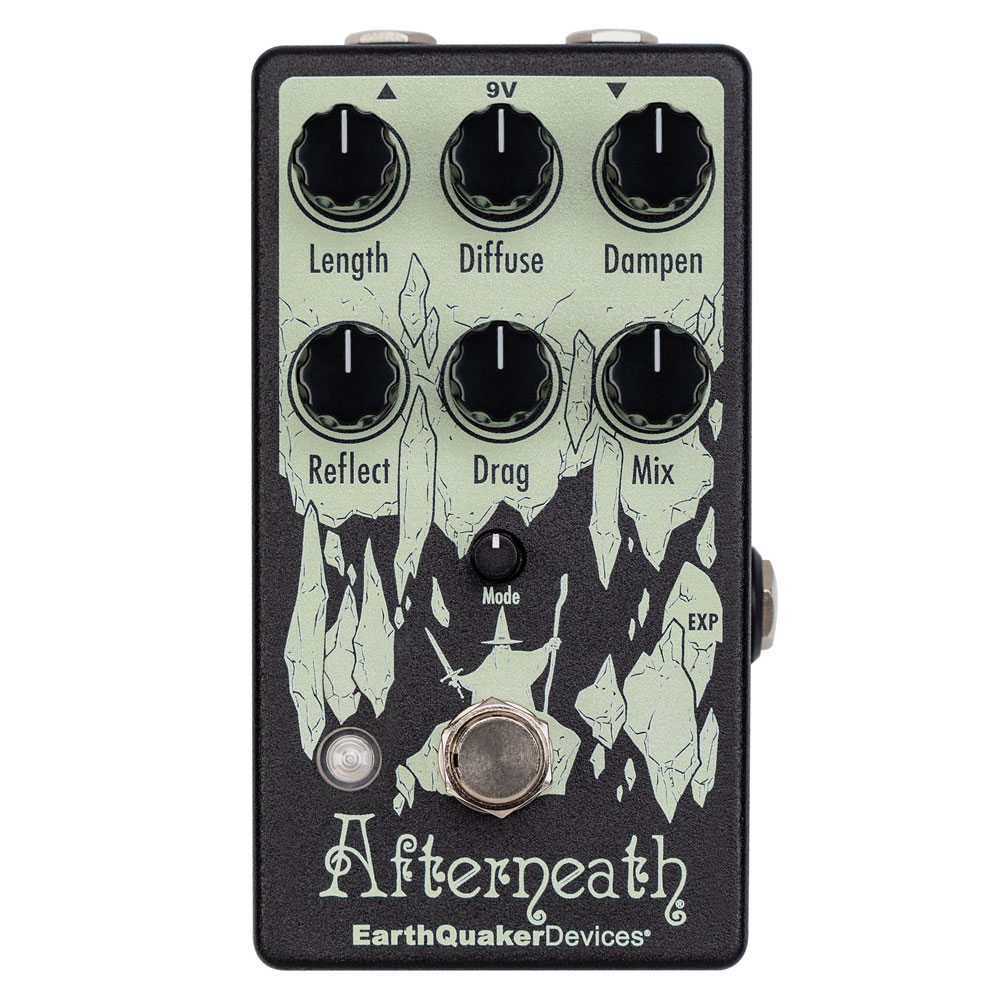
Controls
LENGTH
Use the Length rotary control to control the decay length of the reverb.
DIFFUSE
Use the Diffuse rotary control to adjust the spread of the reverb.
DAMPEN
Turning the Dampen rotary counterclockwise control results in brighter tones. As you turn the Dampen rotary control clockwise you hear darker tones with a mellower top-end.
REFLECT
Use the Reflect rotary control to alter the regeneration of the reverb. Turn Reflect clockwise for more wash and echoes, counterclockwise for less.
DRAG
Use the Drag rotary control to separate the individual digital delay lines. Turn the Drag rotary control clockwise to gather the delay lines close together for a more reverb-like effect. Turn it counterclockwise to pull the delay lines apart for a scattered ping-pong delay effect.
MIX
Use the Mix rotary control to alter the balance between the input signal and the effect. The Afterneath does not go fully wet.
MODE
Use the Mode control to change the way the Drag control functions. The LED will change colors indicating which mode you are in: Unquantized, Unquantized with Slew, Unquantized Volt/Octave, Chromatic Scale, Major Scale, Minor Scale, Pentatonic Scale, Octaves & Fifths, and Octaves.
Expression Jack
This is an expression pedal control jack for the Drag control. The Afterneath requires an expression pedal with a value of 50K, we recommend the Mission Engineering EQD-1. While it will work with a standard 10K expression pedal, a 50K expression pedal will allow you to access the full range of each mode.
Flexi-Switch® Technology
This device features Flexi-Switch Technology! This relay-based, true bypass switching style allows you to simultaneously use momentary and latching-style switching.
For standard latching operation: Tap the footswitch once to activate the effect and then tap again to bypass.
For momentary operation: With the effect off, hold the footswitch down for as long as you’d like to use the effect. Once you release the switch, the effect will be bypassed.
The Afterneath uses electronic buffered bypass, it requires power to pass signal and the buffer is always active. You may experience a pop the first time the Afterneath is switched on after power up.
Tails/No Tails Switching
The Afterneath is factory set in “tails mode.” This means that the wet signal will naturally decay and slowly fade to silence after the effect is switched off. Download the full manual for steps to deactivate this feature.