Sennheiser HDB 630 FAQ
Before You Start
What makes the HDB 630 so unique?
The HDB 630 are the first Sennheiser audiophile headphones designed for on-the-go use, incorporating Bluetooth® to ensure freedom of movement as well as Adaptive ANC to reduce all background distractions. To give our users the highest wireless quality, we incorporated a hi-res BTD 700 USB-C dongle that upgrades compatible USB-C devices into hi-res Bluetooth® transmitters. The headphones’ active design includes new features for audio power customization such as a Parametric Equalizer and Crossfeed.
What are the key features of the HDB 630?
Detailed, neutral tuning and rich vocals
Enhanced hi-res availability with BTD 700 USB-C Bluetooth® transmitter
Hi-res audio with support up to 24-bit/96 kHz
5-band Parametric Equalizer and Crossfeed
Premium headband with IdeatexTM Japan leatherette
What type of transducer does the HDB 630 use?
The HDB 630 features our 42 mm dynamic transducer, built in Ireland. To achieve the target acoustic performance, in addition to a custom Digital Signal Processing tuning, we also updated the acoustic system with enhanced damping, a new acoustic mesh on the magnet, and a deeper back volume to compliment the mesh. The enhanced damping (dust cover) provides relative acoustic transparency and compliments higher frequencies, all of which assist the final frequency response to achieve its Hi-Res Audio certification. The acoustic mesh on the magnet hole helps to shape the upper mid-range and control the target treble, which together enable a more efficient DSP tuning. The new, deeper back volume was designed to complement the acoustic mesh, helping to maintain a high level of consistency across the product range.
I work, commute, and travel a lot. Is the HDB 630 a good choice for on the go?
The HDB 630 supports aptX Adaptive with up to 24-bit/96 kHz sampling rate, allowing you to enjoy high-quality content on the go. The Adaptive ANC removes background distractions to help users hear more of their music. Its lightweight build, low clamping force, generous earcups, and premium Japanese leatherette headband ensure hours of fatigue-free listening.
Does the HDB 630 feature the latest Bluetooth® technology?
The HDB 630 is Bluetooth® 5.2 compliant (class 1) and supports an industry-leading, reliable and stable Bluetooth® connection.
Why doesn’t the HDB 630 feature the latest Bluetooth® 5.4?
We have selected a well-established Qualcomm chipset, as used on our MOMENTUM 4, featuring Bluetooth® 5.2, and further reinforced the chipset to deliver greater audio quality.
Bluetooth® 5.4 does not guarantee better audio quality than 5.2. Bluetooth® 5.2 does meet our requirements for increasing hi-res codec access across smart devices and upgrading the USB audio quality by:
creating a hi-res end-to-end Bluetooth® transmission with the BTD 700 dongle, increasing hi-res compatibility on smart devices (currently ~70% of customers in Japan and Germany, 80% in USA and UK, and 91% in S. Korea have limited/no aptX HD/Adaptive access, source: gs.statcounter)
upgrading the USB audio from standard resolution to 24-bit/96 kHz hi-res quality
Which Bluetooth® codecs are supported by the HDB 630?
The HDB 630 supports SBC, AAC, aptX, aptX-HD, and aptX Adaptive.
It comes with a BTD 700 to upgrade compatible USB-C devices (such as your smartphone or tablet) into a hi-res aptX Adaptive transmitter.
Why doesn’t the HDB 630 support aptX Lossless and LC3?
Our products are aimed at the audiophile community, and they prioritize hi-res audio, stable connectivity, and compatibility with proven technology.
Hence, we developed the HDB 630 using the tried-and-tested aptX Adaptive, which delivers hi res up to 24-bit/96 kHz, adapts to environmental conditions to maintain a stable connection and has a relatively good level of native compatibility in selected smart device as it a matured technology. This codec also meets our requirements for technological maturity and high compatibility.
aptX Lossless supports 16-bit/44.1 kHz in lossless quality, utilizing approx. 1,100 kbps bitrate, In a congested environment, it will also scale down to a lower quality apt-X HD (16 bit 48 kHz). We believe the audiophile community would prefer a codec that offers higher resolution and a better adaptive solution for daily use, hence we focus on improving and increasing apt-X Adaptive compatibility.
LC3 is a codec that does not support Hi-Res or lossless, while the version that support Hi-Res is call LC3+. As our focus is on improving compatibility with smart devices, using the tested aptX Adaptive and BTD 700 to increase Hi-Res compatibility from 16% to 80% of our target consumer.
As part of our development, we not only focused on increasing the number of codecs supported by the headphones, but also on improving source-side compatibility with our new BTD 700 dongle that upgrades compatible USB-C devices into hi-res transmitters.
Do I need the dongle when my Smart Device is supporting Hi-Res Codecs already?
If your smart device is already capable of reproducing hi-res codec to the HDB 630, you do not need to connect the Dongle.
Thanks to the included BTD 700 Bluetooth® USB C Dongle, you can finally get high-resolution wireless sound from a wide range of devices including most phones, tablets, and laptops. No matter which codecs your device supports, you can enjoy brilliant aptX™ Adaptive with your
HDB 630 and the dongle, since it’s an upgrade that makes your smart device capable of delivering hi-res quality to your headphones.
What is so special about the HDB 630’s design?
The HDB 630’s headband design incorporates IdeatexTM Japanese leatherette, which has been tested by IdeatexTM for enhanced reliability (min. 5 years tropical test). We have also used a new paint on the earcups to reduce fingerprint marks.
The yoke and sliders feature a new paint scheme that gives the appearance of metal while retaining the flexibility and light weight of a composite material.
Is the HDB 630 designed or suitable for gaming?
The HDB 630 headphones are designed to deliver a best-in-class audiophile wireless listening experience. If customers wish to use the HDB 630 for casual gaming, they should consider whether the microphone response and connection latency are sufficient for their requirements.
AptX Adaptive latency (80 ms) from Qualcomm or
USB audio – max. latency 40 ms, USB mic – max. latency 40 ms
Aux mode (no microphone) – 30 ms
Is the HDB 630 and BTD 700 compatible with PS5?
Although Sennheiser have provided a Day 1 Update to enable BTD 700 to work with PS5, unfortunately Sony have lock down full support. Hence BTD 700 is ready to be compatible when Sony update their PS5 USB port to behave as a traditional class compliant device.
The HDB 630 looks like the MOMENTUM 4; can I use an equalizer to make the MOMENTUM 4 sound the same as the HDB 630?
The HDB 630’s tuning results from an updated acoustic design – including damping materials, a deeper back volume not used in the MOMENTUM 4, and advanced Digital Signal Processing – to achieve a more neutral acoustic performance.
While users may use a third-party parametric equalizer to adjust the frequency response, this often reduces headroom and maximum perceived volume and may not achieve the desired result due to differences in acoustic system design.
How do I pair the HDB 630 with my device via Bluetooth®?
The HDB 630 will start auto-pairing out of the box. Users can activate pairing by pressing and holding the multi-function button for 5 seconds with the headphones switched off. The LED sequence will light up to indicate that the pairing process has started.
How do I get the best sound quality using the BTD 700 Bluetooth® adapter?
The BTD 700 can be connected to any compatible USB-C device, and must be paired with the headphones before use. To maximize battery runtime, hi-res (24-bit/96 kHz) is not turned on by default, so the user must activate hi-res in the Smart Control Plus App.
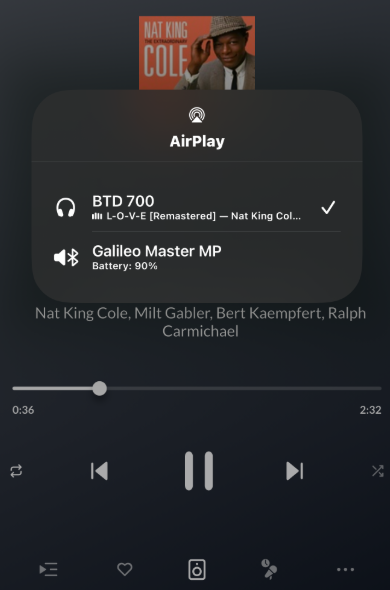
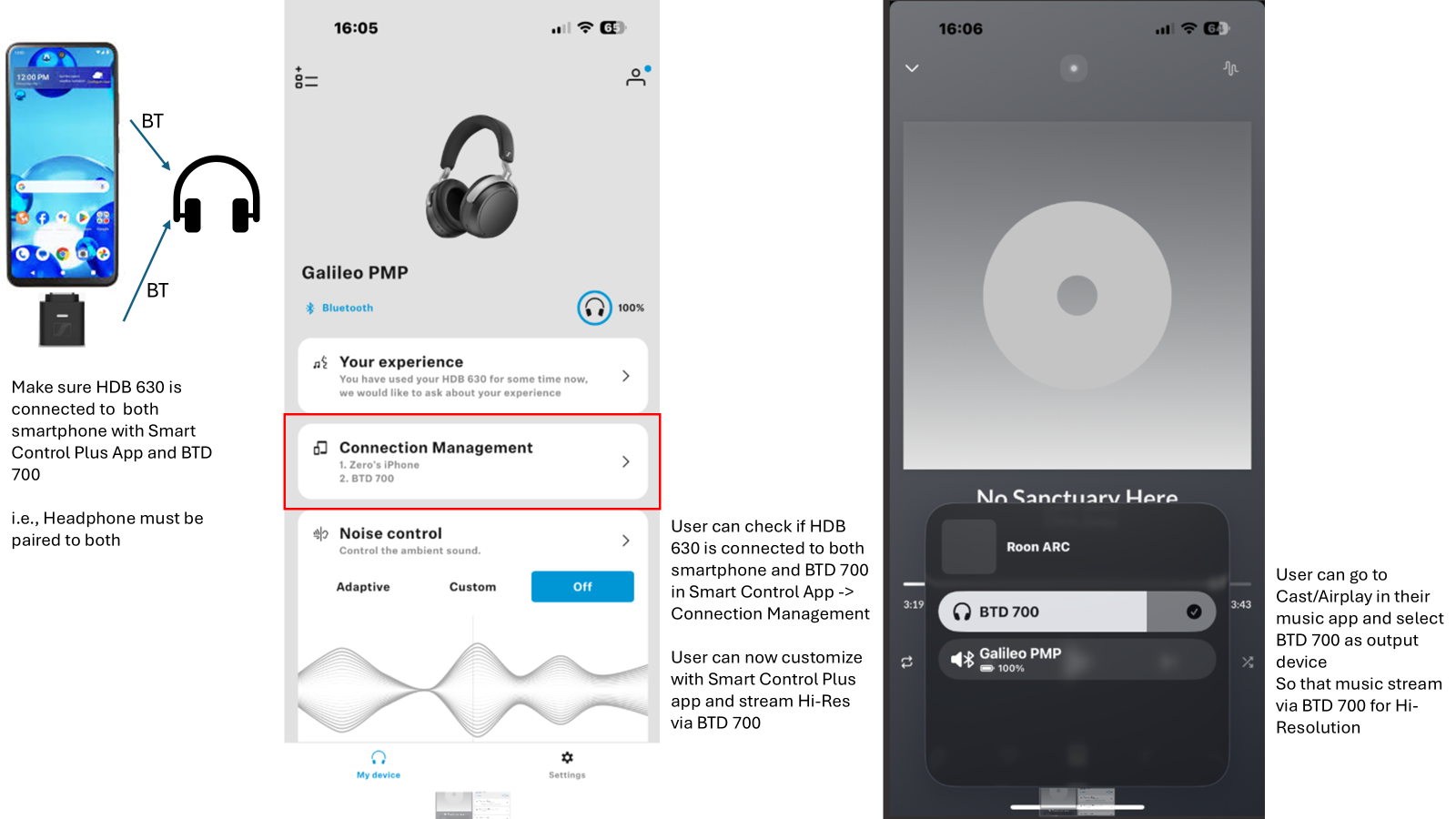
The user may need to select BTD 700 as the output on their device, under the output settings on e.g. Googlecast/Airplay:
BTD 700 LED indicator will turn pink once music is streamed through it.
I have connected the BTD 700 to my smartphone and HDB 630, why is the Signal Path still showing AAC/aptX/SBC while I play back Hi-Res music?
The music may not be streamed over the BTD 700, user can verify this by checking if the BTD 700 LED is pink in colour.
The user may need to select BTD 700 as the output on their device, under the output settings on e.g. Googlecast/Airplay.
Lastly, if this is still not fix, please check in Smart Control Plus App - Audio Mode Priority that Hi-Res 24 Bit / 96 kHz is turned on. This is not enabled by default to optimize runtime and latency
How do I connect the HDB 630 via USB-C for wired listening?
The USB audio supports Plug & Play on compatible devices, with no driver required.
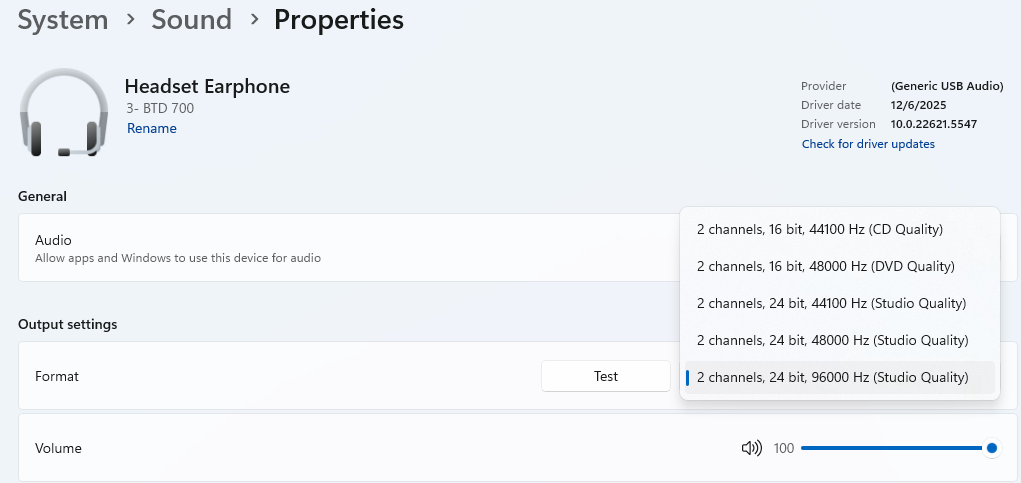
To enjoy 24-bit/96 kHz, Windows and Mac devices may require the user to increase the sampling rate manually in the device’s sound settings
What sample rates and bit depths are supported over USB-C?
Up to 24-bit/96 kHz.
What is the headphones’ battery life?
The HDB 630 can run for up to 60 hours at standard resolution.
When using aptX Adaptive 24-bit/96 kHz with the BTD 700, they can run for up to 45 hours.
How do I charge the headphones?
The headphones are charged via the supplied USB-C to USB-C cable.
Are the HDB 630 waterproof?
The HDB 630 are not waterproof or sports headphones.
What kind of product quality tests are done to ensure Sennheiser product reliability?
All Sennheiser products are intensively tested for product quality and reliability. Our quality tests include several mechanical, electrical, thermal, chemical (e.g., dust and splash resistance), drop, UV color stability, scratch and rub, battery safety and ESD tests, as well as tests for RF/Bluetooth® stability and interference, etc.
These tests allow us to validate the product’s reliability and robustness for a long service life, even in tough conditions. If your product is damaged or malfunctions, you are covered by our global warranty program:
https://www.sennheiser-hearing.com/warranty-conditions/
Can I connect to more than one Bluetooth® device simultaneously (so-called “Bluetooth® Multipoint Connection”)?
You can pair the HDB 630 with up to two devices simultaneously, and it can store up to six paired devices in its memory.
Is the HDB 630 supported by the Sennheiser Smart Control Plus App?
Yes, and users can enjoy the new Parametric Equalizer and Crossfeed Feature with the Smart Control Plus App.
Are the batteries replaceable?
The headphones’ batteries cannot be exchanged. The HDB 630 uses high-quality, embedded, rechargeable Li-Ion batteries that are intensively tested and certified to the highest international quality standards. They are sealed inside the housing for high robustness. The headphones are built to last a long time, and we offer replacement parts and a global warranty program.
https://www.sennheiser-hearing.com/warranty-conditions/
Where can I find further HDB 630 product information?
Further information e.g., a downloadable user manual, can be found on Sennheiser’s HDB 630 product page in the section “Downloads”. Several how-to videos are also available in the FAQs on the product page and on YouTube.
When will the HDB 630 be available in my market? Why isn’t the HDB 630 available in my market (India, LATAM, Non Phase 1-1.1 market)?
Available of product in market is dependent on local regulatory certification process, and in some market, this may take a longer time , hence a difference in availability date. We assured consumer that we are doing our best to obtain certification and will made the product available once all certification, marks and requirement are completed.
Why is the HDB 630 more expensive than the MOMENTUM 4 Wireless?
The HDB 630 introduces a series of improvements:
The HDB 630’s tuning results from an updated acoustic design – including damping materials not used in MOMENTUM 4, a refined back volume design, a new dust cover, and advanced Digital Signal Processing – to achieve the desired acoustic performance.
Hi-Res Audio certification due to the above together with hi-res USB audio and analog input support up to 24-bit/96 kHz sampling rate.
Advanced new Digital Signal Processing (DSP) feature, Parametric Equalizer and Crossfeed inspired by HE-1, bring customized audio to the next level.
The BTD 700 USB-C transmitter comes included to convert compatible USB-C devices into hi-res transmitters supporting up to 24-bit/96 kHz sampling rate.
Refined material – headband fabric is now a premium protein leatherette by IdeatexTM made in Japan, proven to have a lifespan of over 5 years, as well as a new earcup finishing that reduces visible stains.
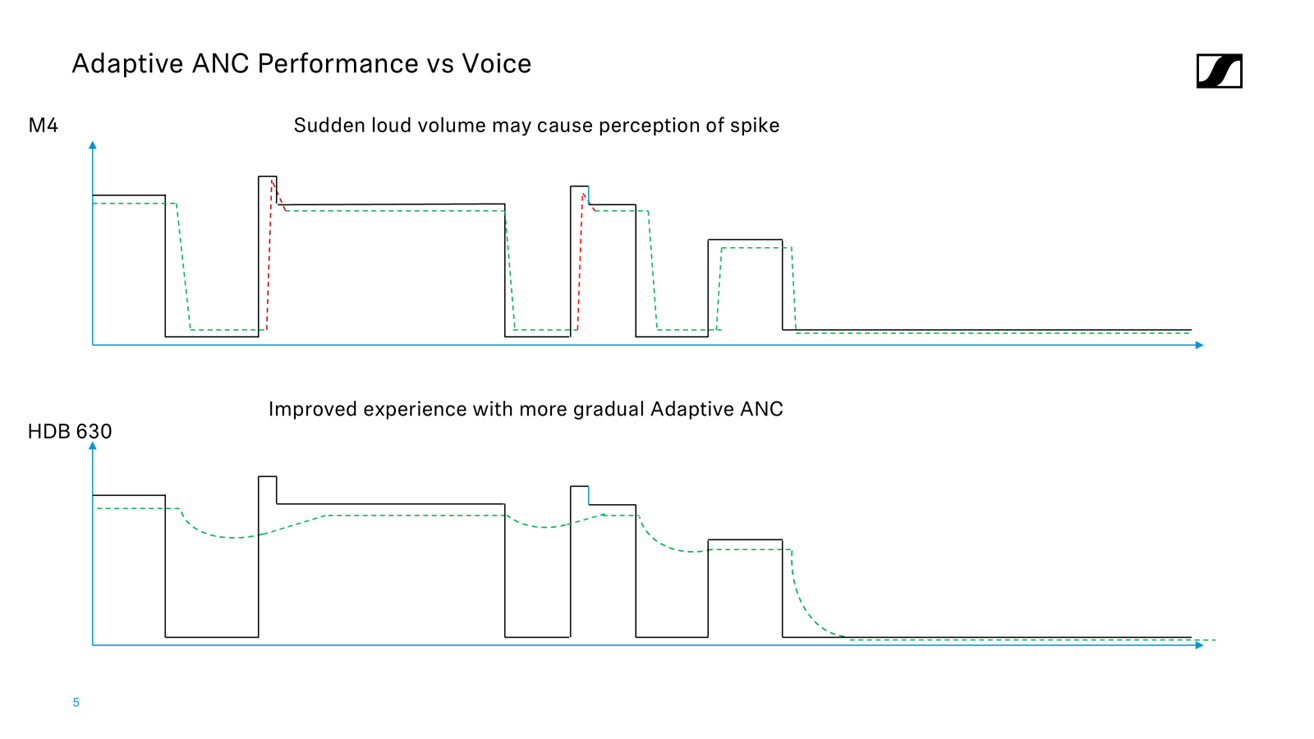
TBC Adaptive ANC – smoothening reaction to sudden nearby loud voice (spike in volume)
Is the HDB 630 replacing the Momentum 4 Wireless or are they an additional model to the family?
The HDB 630 is not a successor of Momentum 4 Wireless, it is a first model of the Audiophile Wireless family, hence it follows the Audiophile naming system of 6 family.
The HDB 630 serves as an upgrade for Momentum 4 Wireless owner who will like to explore the next step in their audio journey and for Audiophile who will like to bring their sound everywhere they go.
How can I enjoy hi-res Bluetooth® on the HDB 630 using an older iPhone model with a lightning port?
Our BTD 700 is a hi-res transmitter that works with iOS devices with a USB-C connector. For iOS devices with a lightning port, users will need a compatible USB-C to Lightning adapter that supports Audio OTG. We recommend that users source MFi-certified adapters.
However, as these are third party dongle, performance of BTD 700 may be affected by it.
Does the HDB 630 comes with the USB C to A Adapter provided with retail version BTD 700 Adapter?
We provide standalone dongle version of BTD 700 without the USB C to A Adapter as part of the sustainability effort to reduce E-Waste as USB C is a common standard connection available. End consumer can use the BTD 700 with their standard USB C to A adapter.
Is the HDB 630’s tuning based on the Harman Target?
The HDB 630 is tuned by our acoustic engineers in house to combine the benefits of active noise cancellation (ANC) with a sound presentation preferred by the audiophile community, i.e. our Sennheiser Signature Sound.
We also understand that users want to recreate a speaker-like listening experience, so for the first time we have incorporated the Crossfeed feature into our wireless headphones, a feature inspired from HE 1.
Crossfeed is an audio technique that simulates a natural listening experience by blending a small portion of the left audio channel into the right channel, and vice versa, with a slight delay. Our engineers developed the Crossfeed on the HDB 630 using the HE 1 as a reference to create a natural listening experience.
Do the Parametric EQ and Crossfeed feature require additional processing power that is not available on the MOMENTUM 4?
The Parametric Equalizer, Crossfeed and overall tuning of the headphones requires a greater level of processing power than the MOMENTUM 4 offers. Our R&D team thus optimized the headphones’ development to maximize the chipset’s performance. We also overcame the original limit, enabling hi-res 24-bit/96 kHz via USB while retaining the voice channel.
How much bigger and heavier is the HDB 630 compared to the MOMENTUM 4?
The HDB 630 is 22 g heavier than the MOMENTUM 4. Due to the acoustic system’s refinements, the HDB 630 earcups are 4.5 mm deeper, while all other dimensions remain the same. This increase accommodates the new back volume, optimized to balance the compact design with sufficient airflow and sound propagation behind the transducer. Our mechanical engineers ensured that this design change does not affect the headphones’ overall comfort.
Can I use the HDB 630 when the battery has no charge? / Can the analog input be used without turning on the HDB 630?
As we use advanced Digital Signal Processing in part to craft the desired acoustic performance, the HDB 630 can only be used while switched on, to ensure the user hears a consistent sound signature no matter which input they use.
Does the BTD 700 work over Bluetooth only or does it support streaming over Wifi?
The BTD 700 work over bluetooth utilizing Qualcomm’s range of high quality audio codec such as aptX Adaptive to transmit Hi-Res audio of up to 24 Bit / 96 kHz. This solution is choose as the scalable nature of aptX Adaptive will optimize performance based on requirement of Stability, Resolution and Latency.
Does the BTD 700 work with other headphone or only HDB 630?
The BTD 700 work with compatible bluetooth headphone. To utilize any given codec, both headphone and BTD 700 needs to support it, hence BTD 700 won’t upgrade any headphone’s embedded codec. For 3rd party headphone, it is possible to use it with BTD 700 but compatibility may vary due to the 3rd party differentiated electronics design or chipset.
Why is HDB 630 tuning done actively? Why are we not tuning the HDB 630 passively? Is the DSP tuning use to compensate for poor transducer quality or poor passive acoustic?
HDB 630 uses an active stage as part of its acoustic tuning to address the challenge, as closed-back ANC-Headphones with relevant performance cause acoustics that are contrary to good passive acoustics.
The HDB 630 utilizes the same family of 42mm transducer that you have seen on some of our other audiophile products, hence its quality and performance. There is no poor passive acoustics as the HDB 630 acoustic design are developed to ensure the most optimal ANC and Sound quality performance in an active use case, combining our known transducer with advanced Digital Processing design.
Refinement in other part of the acoustic system was also enacted such as the new acoustic mesh, dust cover and deeper back volume. The active tuning is hence only a part of its acoustic.
We encourage experiencing it as we are confident of the quality it can deliver.
When connecting HDB 630 to my smartphone, does it consume my smartphone battery?
The HDB 630 will maintain a power drawn from your smartphone when connected to listen to lossless music over USB. The HDB 630 battery have a runtime of 60 hours on standard resolution on a 2.59 Wh battery, which is 14% of a smartphone battery
⋅ | M4/HDB | 17 Pro M | vs M4/HDB | 17 Air | vs M4/HDB
mAh | 700 | 4,823 | 6.89 | 3,149 | 4.50
V | 3.70 | 3.89 | 1.05 | 3.94 | 1.06
Factory | 1,000 | 1,000 | 1,000 |
Wh | 2.59 | 18.75 | 7.24 | 12.4 | 4.79
During Use
What should I do to ensure the best experience once I unpack my new HDB 630?
We recommend all users check for and install the latest updates on their HDB 630 to enjoy the best experience.
For the best wireless quality, use the USB-C Bluetooth® transmitter BTD 700 to enjoy hi-res audio content with any compatible USB-C device, and you can enable up to 24 Bit 96 kHz Hi-Res quality through the Smart Control Plus App
BTD 700 LED will indicate pink once music is streaming through it.
What should I check or adjust to get the best sound experience?
Consider turning on Hi-Res mode for hi-res Bluetooth® sound quality. This may reduce wireless runtime from up to 60 hours to up to 45 hours.
When using the BTD 700, check whether the LED turns pink, which indicates active transmission. Otherwise, check that the BTD 700 is selected as the output device on the Cast options.
Users can check this in Smart Control Plus App > Settings > Signal Path on Codec and Sampling rate.
Sound quality and volume leveling may be app- and device-dependent. Please check the respective audio settings to ensure the right ones are selected.
How do I know if my music is being transmitted in hi-res to the headphone?
You can view the transmission codec and sampling rate via the Smart Control Plus App’s Signal path.
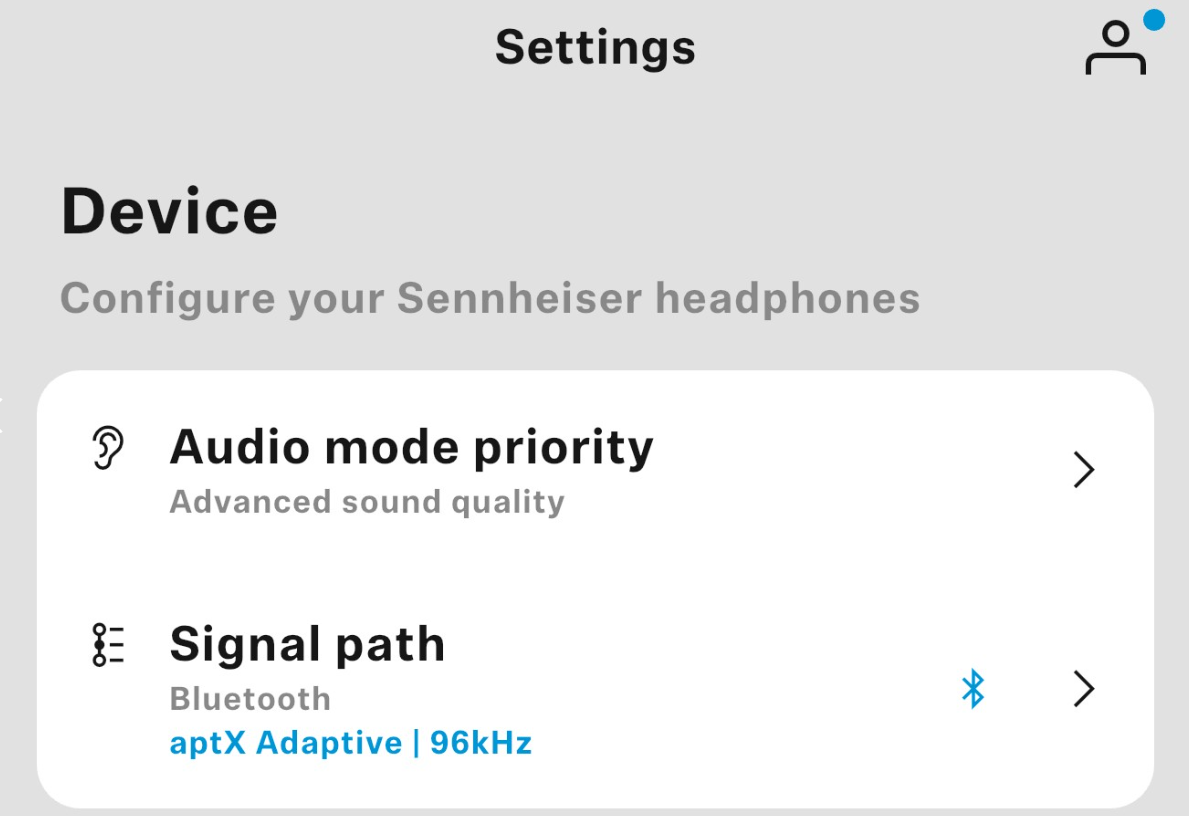
Please note that resolution is dependent on the music source sampling rate, and that the Bluetooth® codec does not support up-sampling.
My source supports aptX Adaptive; why can’t I hear any difference in audio quality?
aptX Adaptive is a scalable codec that adjusts the bitrate based on environmental conditions to maintain a stable connection.
In addition, if aptX Adaptive is activated for every playback, it will gradually scale up from a nominal to a higher bitrate over 20 seconds to ensure an uninterrupted experience.
Why does the product have two frequency response ranges (6 Hz to 40 kHz and 6 Hz to 22 kHz)?
High-resolution signals are required to achieve a frequency range of 6 Hz to 40 kHz. This can be achieved over 24-bit/96 kHz on aptX Adaptive, USB audio and analog inputs. For other signals, the speaker may output a frequency response range of 6 Hz to 22 kHz.
Do the headphones switch off automatically when not in use?
The headphones have an auto-off function, and the user can select the duration (15/30/60 mins and Never) via their Smart Control Plus App. The headphones will also turn off automatically when placed correctly in their carrying case.
How can I clean and maintain my headphones?
Keep all liquids away from the product. Do not use any solvents or cleaning agents. We recommend cleaning the headband silicone and earpads frequently, especially after intense use or before/after storing for a long period of time. Wipe off any residual grease from skin contact to help extend the material lifespan. Only use a soft, dry cloth to clean the product. To clean the charging socket: Blow vigorously over the charging socket. If necessary, carefully remove any dirt clogging the charging socket using a dry, soft brush or a dry interdental brush. Only apply gentle pressure.
How do I enable and customize the Parametric EQ?
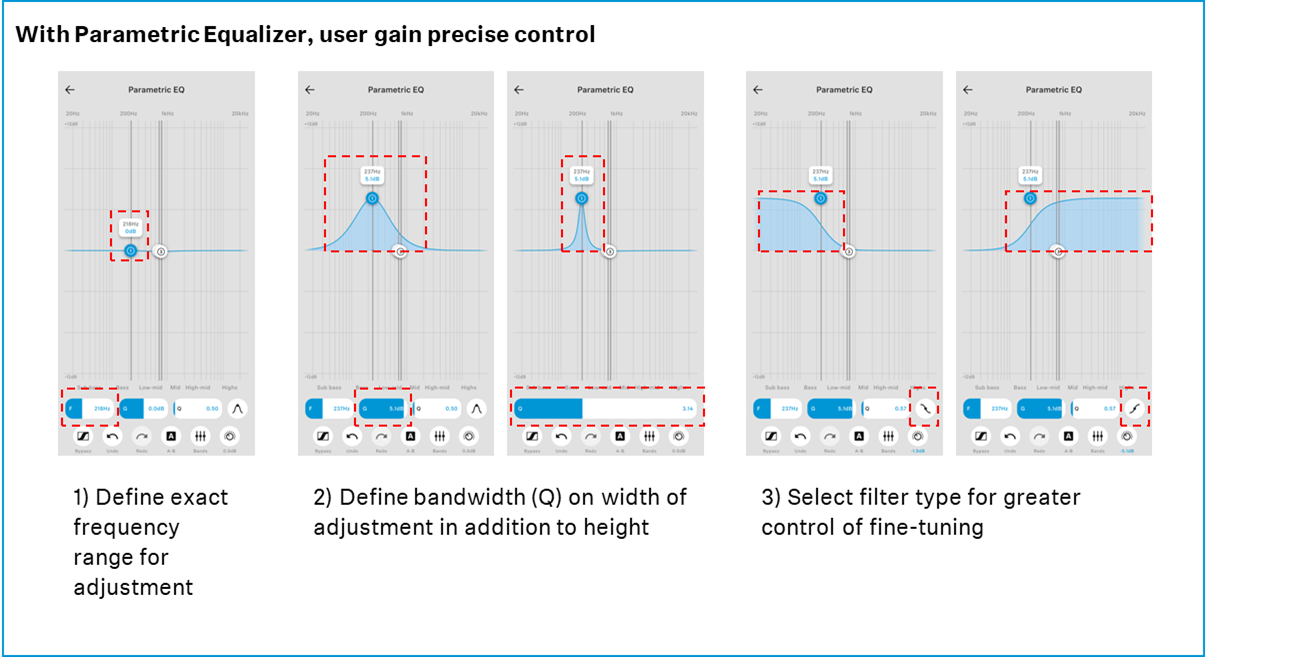
The Parametric Equalizer can be selected in the Smart Control Plus App.
Does the Parametric Equalizer apply a headroom deduction when I increase the gain? Which result in the music becoming lower in value.
We have provided a range of headroom buffer and there will be no headroom / gain deduction if the adjustment are within range:
1-8kHz: +3dB
9-9.9kHz: +1.5dB
Decreasing gain of each filter will not affect total headroom
Any changes exceeding this range will result in the headroom gain been reduced accordingly to prevent clipping.
Why is my music maximum volume softer after I use Parametric Equalizer?
Digital signal processing can result in audio exceeding the allowed range, or clipping. To prevent audible distortion, a slight attenuation to the signal is applied to provide the buffer for any increase in gain. This will then result in a perceived lower maximum volume.
We have provide some headroom buffer to reduce clipping when doing PEQ adjustment:
1-8kHz: +3dB
8-9.9kHz: ~+1.5 dB
How do I use the Crossfeed feature?
Crossfeed can be selected in the Smart Control Plus App. Select between off / low / high depending on your requirements for the respective music experience.
How do I switch between ANC and Transparency mode?
You can use the gesture control on the touchpad to switch between active noise cancellation (ANC) and Transparency mode. To switch between the modes, tap the touchpad twice. Users can also control these via the Smart Control Plus App, which also allows them to turn the ANC on/off.
How do I optimize sound for different genres or environments?
For different environments, users can select the different ANC and Transparent hearing settings using the Smart Control Plus App:
Manual – Full control of ANC and Transparent mode for each user’s needs
Adaptive – Headphones will adjust the ANC based on the environment
Off – Allows users to listen to music with no additional noise cancellation processing
Users can optimize the listening experience for different genres of music using the Parametric Equalizer and Crossfeed.
How do I check the battery level?
The battery level can be checked using three options:
The display on your smartphone screen (device- and OS-dependent)
In the Smart Control Plus App
Press the multi-function button twice to hear voice prompt feedback through your headphones and/or check the LED indicator.
How long does a full charge take?
A complete charging cycle takes approx. 2 hours
How does fast charging work, and how much playtime does it give?
Fast charging provides users with an optimal runtime of 7 hours after just 10 mins of
charging a near-empty battery.
Can I use the HDB 630 while it’s charging?
Yes, users can charge-and-play the HDB 630 headphones using the supplied USB-C to USB-C cable. Third-party cables can be supported, but we recommend USB-IF certified cables to ensure optimum performance.
How do I check the current firmware version and update it?
The firmware status can be checked in the Smart Control Plus App under Settings > Firmware
Why is there no Sound Personalization in HDB 630?
As the HDB 630 is designed for audiophiles, it incorporates a powerful Parametric Equalizer which enables the great degree of fine-tuning preferred by this community, without introducing a layer of audio conversion/compression.
Why is the volume softer when playing music via BTD 700 than when connecting directly to source? (Especially on Android and Digital Audio players)
The volume control of USB Audio device such as BTD 700 is dependent on the source and how it controls volume. Certain OS may have limitation when it comes to volume control for USB Audio Device, where volume between Source (e.g. Smartphone) and Output (Headphone) are independent.
Try increasing the volume on your source device to maximum first, followed by your headphones (slide up to increase volume) – (Recommended for Android-based device with low volume)
Check if a volume limiter has been turned on (e.g. ‘Reduce Loud Sound’ on iOS)
Check in the app if Auto-Leveling / Volume Normalization has been turned on.
Why is the volume quieter when playing the same song via a different app?
The track volume may depend on a few factors, but if the same exact file outputs at different volumes, this could be due to Auto-Leveling / Volume normalization.
Try turning off this function in the app settings and compare the results.
Spotify
Tidal
If a problem occurs
I cannot hear any sound. How can I fix this?
Ensure the headphones are turned on even if using analog input
Check the volume level on both source and headphones
Try reestablishing the connection
Try with a different connection
Perform a soft reset if the above actions don’t work
Perform a factory reset if a soft reset doesn’t work
How can I reset the headphones?
Press and hold the multi-function button for 15 seconds
How can I perform a factory reset?
The headphones can be reset to their default factory settings using the Smart Control Plus App, under Settings > Factory default settings.
I cannot pair the headphones with my Bluetooth® device. How can I fix this?
Try the pairing process again
If pairing doesn’t work, please try pairing with another source device to verify whether this is a source or headphone issue
Try resetting the headphones and pair again with the original source. If the headphones cannot pair with another source, please contact our customer service.
The Bluetooth® connection keeps dropping out. How can I fix this?
Try turning off Hi-Res (24-bit/96 kHz) in your Smart Control Plus App to prioritize connection stability
Try moving your source device, as the transmission antenna may be covered up, reducing transmission quality
If possible, move to an area with less wireless congestion
Why is aptX HD or aptX Adaptive not working?
Please check whether your source device supports both codecs.
Hi-Res mode is also not enabled by default in the Smart Control Plus App to optimize runtime. Users can change this in the Smart Control Plus App’s Settings > Resolution.
Some OS may prioritize different codecs, and users can enter Developer Mode in Android to change the default codec.
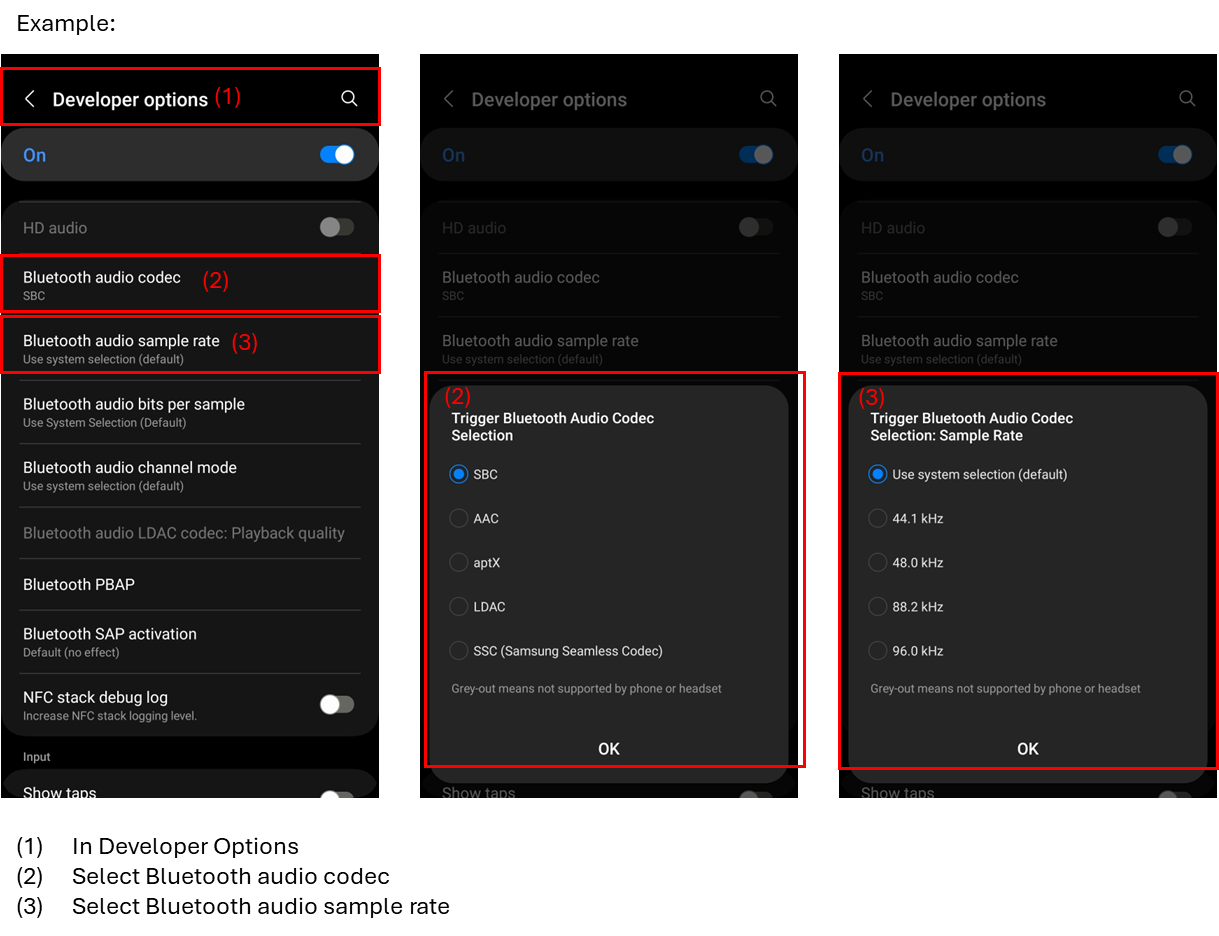
I have enabled 24-bit/ 96 kHz mode on the Smart Control Plus App, and my phone or dongle supports aptX Adaptive; why am I not getting a high sampling rate over Bluetooth®?
Some smart Android devices may not have aptX HD/Adaptive and/or Hi-Res mode enabled by default. If this is not enabled on the source device, the HDB 630 will not receive a hi-res signal and in Signal Path will display accordingly. In some cases, this could also be due to an OS update limitation. Please refer to your smart device manufacturer’s support/guide to find out how to enable the required codec or resolution, which may be found in the Android Device Developer Mode.
Some OS may prioritize different codecs and sampling rates, and users can change the default settings.
On Windows:
iOS: Navigate to Settings, Sounds and Haptics, Headphone Safety, USB Audio Accessories, and selecting Forget All. Reconnect and try again
The headphones are not charging as usual. What can I do?
Clean the charging socket
Check the charging source
Charge the rechargeable battery until the LED display lights up again (at least 30 minutes). If the rechargeable battery is completely discharged, it may take several minutes for the LED display to indicate the charging process
Always store the headphones with an optimal charge level (e.g. 80%) and perform regular charging if unused for a long period to prevent deep discharge.
How can I adjust the headphones to a comfortable volume or make them louder?
The headphones’ output volume is dependent on the headphone, source, and app settings.
The headphones’ volume can be adjusted via the touch panel and on the source (if supported)
Some sources may have volume limitations due to regulatory requirements. Users can review and amend this in the device’s sound settings (e.g. iOS > Settings > Sounds & Haptics > Headphone Safety > Reduce Loud Sound)
Some apps may apply Auto-Leveling or Volume Normalization to ensure that all music is played back at a similar level. This app may apply negative gain in most cases, affecting output volume. Changes can be made in the app’s settings.
Volume is too low even when set to maximum. What is causing this?
Certain OS may have limitation when it comes to volume control for USB Audio Device (BTD 700) ,where volume between Source (e.g. Smartphone) and Output (Headphone) are indepdendent. Try increasing the volume on your source device to maximum first, followed by your headphones (slide up to increase volume)
Some sources may have volume limitation due to regulatory requirements. Users can review and amend this in the device’s sound settings (e.g. iOS > Settings > Sounds & Haptics > Headphone Safety > Reduce Loud Sound)
Some devices may have different audio implementation even if their OS are the same. This can be verified by comparing the volume across the device with same source app.
Some apps may apply Auto-Leveling or Volume Normalization to ensure that all music is played back at a similar level. The app may apply negative gain in most cases, affecting output volume. Changes can be made in the app’s settings.
Music volume may also be dependent on the audio mastering of each track. Users can test the headphones with other music to identify if this is the cause.
What can I do if the audio quality on my Windows system is poor?
If using BTD 700 or USB Audio mode, select a higher 24-bit/96 kHz sampling rate in the sound settings
Try changing the USB connection or switching from the USB hub to the main device itself
Some apps support Exclusive Audio Mode, which allows a single app to take full control of your audio device and prevents other applications from playing sound simultaneously. This mode may help with audio performance but may disable other system sounds or notifications.
What should I do if I have a Bluetooth® multipoint connection with a Windows PC and cannot switch to my other device?
Please check if two devices are currently connected via the Smart Control Plus app
Try disconnecting one device and reconnecting the desired device
Audio is lagging behind video. How can I reduce latency?
Disable Hi-Res mode to reduce latency
Use the USB Audio or Aux connection if the Bluetooth® environment is congested.
If connecting HDB 630 through BTD 700, triple press the button on BTD 700 to trigger gaming / low latency mode, which will scale down from 96 kHz to 48 kHz to optimize latency
I am experiencing crackling in my Teams Call or other Call Software
This could be due to Call Recording in software having a maximum sampling rate of 24 bit / 48 kHz or call recording only able to support 24 Bit / 48 kHz and user enabling Hi-Res in Windows Sound Settings. To resolve this
Set Windows Sound Settings to 48 kHz.
Consider instead of using Windows setting to force 96 kHz, utilize music app exclusive mode or setting to trigger Hi-Res bypass.
The ANC doesn’t seem to be working. What should I do?
Check the ANC settings in the app, i.e. whether transparent hearing has been turned on or if ANC has been switched off
If this doesn’t work, please perform a reset and check again.
The USB-C connection isn’t recognized. How can I troubleshoot this?
Check whether this is a source or device error by trying to connect the USB to another device.
If it works on another device, try connecting via another USB port and/or bypassing the USB Hub on the original device
Try with a different USB cable (cable needs to support Data/OTG)
Trying cleaning the USB port or headphones
Consider restarting the source devices or selecting “Forget all USB Audio Accessories” if the headphones can connect to other devices.
My BTD 700 is working properly on other device, but it cannot be connected to iPhone/smart device with BTD LED blinks Red twice
This is due to an iPhone security setting where Wired Accessories setting could have restricted setting preventing connection of 3rd party device. User can review in Setting > Privacy & Security > Wired Accessory, and set to option that allow for new accessories.
How do I know the headphones fit properly?
They should feel comfortable, with no ‘sound leaking’ that lets in outside noise or causes music distortion.
How do I ensure that my voice is picked up clearly during phone calls?
Ensure that the headphones are worn properly on your head with the microphone pointing towards your mouth.
What should I do if the headphones’ sound quality starts to deteriorate due to clogging?
Not applicable for headband-headphones. Follow the Care/Maintenance instructions found in the manual. We recommend regular cleaning as this will help prevent such issues from occurring.
Which spare parts are available for my HDB 630?
Sennheiser offers replacement earpads and aux cables as spare parts.
The BTD 700 can be purchased as a new device from any authorized retailer.
Can I use the Smart Control Plus App when streaming music over BTD 700
This is possible, user will need to connect HDB 630 headphone to both BTD 700 and smartphone with Smart Control Plus app (Multipoint) at the same time, and they can use Smart Control Plus App for customization while streaming music over BTD 700.
How can I contact the Sennheiser service department?
The Sennheiser customer service contact details can be found here:
https://www.sennheiser-hearing.com/contact/
If you experience any problems with your device, we recommend checking for solutions in our troubleshooting guides first or, if necessary, claiming on your warranty (Service & Spare Parts):
https://spares.sennheiser-hearing.com/
In case of a warranty claim, make sure you include all original order references in your message details. Your request will be routed to your country-specific support team.
When following up on any support requests, including warranty claims, always reply to our latest e-mail. Make sure to include your request’s case reference number (marked in the e-mail’s subject line, starting with a “C”) in the subject line. This ensures that your response is properly registered in our systems.
My source is unable to connect to the HDB 630 and I need to re-pair them. Why is this the case?
This is likely due to HDB 630 maxing out its simultaneous connection limit, which is 2 with Multi-point on by default.
Hence, a re-pairing will force the connection, but this should not be the solution.
User can check what device are connected to HDB 630 in Connection Management of Smart Control Plus app and disconnect un-needed device. Once this is done, user should be able to reconnect the required device.
I am using a USB C to A Adapter on my laptop and hear cracking sound/distortion in the audio.
According to Qualcomm, this issue is caused by either the USB C to A adapter, USB C Port or connection through a hub. We recommend use to try different adapter or a different port and review the result.
Extended In-Depth FAQs
I’d like to know the acoustic differences compared with MOMENTUM 4 — such as the magnet, coil, diaphragm, back volume, front chamber, mesh, damper, etc.
And if possible, it would be very helpful to understand which part of the frequency response each of those changes affected.
To tune the headphones for your preferred experience, we used both acoustic system refinements and advanced DSP to achieve the desired result.
For the acoustic system design, we made three major refinements:
- Adding a new, optimized acoustic mesh behind the magnet hole
This helps to smooth the upper mid and lower treble ranges.
Complimenting the acoustic mesh design, we optimized the back volume, making it deeper to balance the compact form with sufficient airflow and sound propagation behind the transducer. This also ensured a high level of consistency across the model.
The new dust cover was tested and selected with transparency in mind. This also improves high frequency pass through and helped the product achieve Hi-Res Audio certification.
For all the above, we also needed to update the noise cancellation function to complement these changes.
I’d like to know the differences in the chipset compared with MOMENTUM 4. Does it have an additional DSP like the MOMENTUM 4? What is the model number?
The chipset is the same used in the MOMENTUM 4. We do not use any additional digital signal processors. The product comes with an ADAU 1787 codec purely for ANC and mic processing.
We fully leveraged the current System-on-Chip’s performance to achieve the required acoustic quality, while ensuring stable operation. The electronic components have also been refined to optimize ESD (electrostatic discharge) performance.
“The HDB 630 is equipped with automatic DSP tuning, which operates only when active, even during analog input.”
Does this mean that, when using a 3.5 mm analog cable, the analog signal from the cable is converted to digital (A/D) inside the HDB 630, then processed/tuned digitally, converted back to analog (D/A), and finally played through the HDB 630’s built-in amplifier?
In other words, is it correct to say that it cannot be driven by an external amplifier? So differences in external amplifiers’ performance would not (or only minimally) affect the sound.
The HDB 630’s analog input, similar to that of the MOMENTUM 4, does not pass directly through the 2.5 mm input jack to the transducer, as it goes through the audio processor before being output to the HDB 630’s transducer.
However, it is not correct to say that the HDB 630 cannot be driven by an external amp. When using an analog input, the volume output may be affected by your amplifier’s volume level. However, active headphones have a maximum SPL (sound pressure level) limit.
The statement that “differences in external amplifier performance would not (or only minimally) affect the sound” is also highly subjective, as a poorly designed amplifier may still affect the overall listening experience.
Compared to M4AEBT, are there any advancements or improvements in the built-in amplifier section?
Research was conducted on the benefits of adding an internal amplifier, and after thoroughly reviewing the audio performance, we concluded that the current electronics design provides the most optimal performance.
To deliver the best audio experience, we designed and included the BTD 700 to enable hi-res Bluetooth® transmission from compatible USB-C devices, which we believe offers greater audio benefits to the user than adding an internal amp.
Which aspects of the acoustic design inherited the DNA of the HD series?
Sennheiser launched the HD 630 VB in the mid-2010s. The HDB 630 inherited the series’ concept of customizable audio and further improved it with its new Parametric Equalizer and Crossfeed feature.
Great headphones deliver a great listening experience, and that’s what makes the HD 6 series so well-loved.
We studied audiophile responses on forums, etc. and discovered that users love the HD 600 but wanted to boost the bass, but were limited by system distortion caused by higher driver excursion.
The HDB 630 continues the HD 6 series’ tradition of strong vocal performance with fast, extended bass enhanced by its closed-back design. This design also allows end users to easily tune the HDB 630 to their needs using the Parametric Equalizer.
Is E.A.R. technology (angled transducer) used in this product?
The HDB 630’s transducer is angled relative to the user’s ear.
Is the Parametric EQ available exclusively on the HDB 630? If not, which other products include it?
The Parametric Equalizer is currently developed exclusively for the HDB 630, as is the Crossfeed.
The Parametric Equalizer for the HDB 630 is also equipped with Filter Selection and three filter types for a greater level of customization.
Is AI voice pickup function being used in HD 630?
No, it is not.
Is there any difference in the call microphone compared to the MOMENTUM 4? If so, in what ways has it been improved?
The microphone quality is the same as on the MOMENTUM 4, which delivers a rich and natural vocal.
Is it possible to connect using a 4.4 mm balanced cable? If so, are the parts the same as those of the HD 620S?
An analog balanced connection is not required for the HDB 630. For users who prefer high-quality wired transmission, the USB audio connection has been designed to support 24-bit / 96 kHz input. Please note that spare parts from the HD 620S are not compatible, as the HD 620S uses a twist-lock connection, which the HDB 630 does not.
Compared with the M4AEBT and ACPAEBT, which type of users is this product intended for?
The HDB 630 is designed for the audiophile community or user who likes a fast, extended bass, clear, life-like/intimate vocals, and a controlled treble for a natural, almost-open-like listening experience.
Are the parts compatible with the M4AEBT?
Yes, the Earpads (700210) and Audio Cable 2.5 to 2.5 Black (700206) are available as spare parts for both products.
How does the transmission perform indoors with obstacles?
The transmission performance depends on the type of obstacles and varies by wall material/thickness, background wireless congestion (if any), and where other objects are relative to the device.
The HDB 630 together with the BTD 700 maintain a stable performance by scaling the Bluetooth® transmission bitrate with e.g. aptX Adaptive in a congested environment to prevent drop-off, increasing it again when the environment allows.
As an addition to the HD6 series, what is the most compelling selling point of these headphones apart from Bluetooth®?
Please note that the greatest benefit is not from a single feature, but from the synergy of features developed based on user stories.
The HD 6 series’ hallmark – detailed neutral tuning and rich vocals – is combined with ANC and a closed-back design, allowing users to enjoy their favorite audiophile sound anywhere, not just at their dedicated listening spot. This extends the listening experience from brief daily sessions to wherever they go. Imagine listening to Pink Floyd Dark Side of the Moon from Singapore to New York on a 19hrs flight.
Users may wish to adjust the frequency response to suit their preferences. This is not possible on a wired setup unless a digital signal processor is included in the audio chain. The HDB 630 integrates PEQ and Crossfeed to provide all of this in a single headphone.
No additional DAC/amp is needed when upgrading from IEMs or low-impedance, high-sensitivity audiophile headphones, thanks to high-quality 24-bit / 96 kHz Bluetooth® and hi-res lossless USB audio.
I understand the HDB 630 differs slightly from the MOMENTUM 4 in terms of shape and materials. Could you share the reasoning behind these choices? Was it only about comfort, or did factors such as sound quality or ANC performance influence the decision?
The HDB 630 is 22 g heavier and the earcups are 4.5 mm deeper (or thicker) than those in the MOMENTUM 4.
The increase in earcup size is required to accommodate the newer back volume, which is optimized to balance the compact form while allowing sufficient airflow / sound propagation behind the transducer.
The headband material was changed from fabric to IdeatexTM protein leatherette made in Japan. This high-quality material provides a premium tactile feel with a robust lifespan (certified for 5 years, tested for 8 years by Ideatex Japan). Ideatex protein leatherette uses silk protein, a byproduct of the fashion industry.
The earcups have a refined finish that resists visible stains, as these areas are frequently handled and this finishing helps the headphones to stay pristine.
Are there any stories about planning or development that focused particularly on the Japanese market?
- Development and inclusion of BTD 700 with the HDB 630
A short audiophile documentary showcases Japanese audiophiles’ influence as part of our user story creation. We focused not only on developing great headphones but also on ensuring a high-quality delivery system from source to headphone. This is why we developed and included the BTD 700 with the HDB 630, as it provides hi-res Bluetooth® capability to smart devices that do not support Qualcomm aptX HD or Adaptive (about 70% of the Japanese market). Without this, users may not experience the full benefit of our headphones.
- Runtime
The HDB 630 can run for up to 60 hours at standard resolution. When using hi-res 24-bit / 96 kHz via the BTD 700, it can run for up to 45 hours. These runtime conditions were defined during research carried out at E-Earphone Japan (and also Fujiya-AVIC).
- As a frequent traveler to Japan, one of our designers noticed how train announcements sounded over headphones. For the HDB 630, our ANC engineer refined the timing of the Adaptive ANC response. This adjustment allows users to enjoy a more comfortable listening experience, even when standing under broadcast speakers on a train station platform.
As Japan is an important audiophile market for us, the following Japanese artists/music became important parts of our headphone tests:
- Kitaro – Matsuri (live) – Bass response: Too heavy a bass can feel congested as the spacing also feels compressed. Too light a bass, however, fails to reproduce the echo of the drumbeat. Excellent dynamic range. -Hikaru Utada – First Love – From the First Take – Tests reveal the realism of female vocals and whether the vocals are too harsh or shouty.
- Shima Uta – The Boom sanshin – Represents string instruments well, especially the introductory solo. -Do As Infinity – Yesterday & Today – Tests Crossfeed and the balance between pop rock and symphonic accompaniment.
- Wagakki Band – Doppo – Flute and female vocals, ideal for instant sibilance checks.
Is there a particular sound signature that the new product is aiming for (e.g. from an existing audiophile product)? And if so, why?
The HDB 630 combines the best of the present and the future. As the first closed-back ANC headphones in the Sennheiser Audiophile portfolio, it delivers an unprecedented audio experience.
We studied forums and learned that audiophiles who love the HD 600 often wanted to boost the bass, but were limited by system distortion due to higher driver excursion.
The HDB 630 continues the HD 6 series’ tradition of strong vocal performance while providing fast, extended bass enhanced by its closed-back design. Its design philosophy also allows users to easily fine-tune the HDB 630’s sound to their needs using the Parametric Equalizer.
What kind of role will wireless audiophile products play for Sennheiser in the future? And what steps will Sennheiser take to further expand this category?
Wireless audiophile products offer multiple benefits to our users:
They allow audiophiles to trade up into the HD 6 category over a gradual learning curve, and reduce the need for additional DAC/amp investment.
They serve as a complimentary option to other HD 6 series models for mobile listening, giving audiophiles the opportunity to enjoy their passion for longer periods each day.
They also serve as a stepping stone for our premium headphone (MOMENTUM 4) users to expand their listening experience and explore the freedom of wireless use.
Wireless audiophile products aren’t just about going wireless. Their architecture enables innovations such as the Parametric Equalizer and Crossfeed, giving users a better way to experience their favorite tracks.
What measures have been implemented to prevent hiss noise?
Wiring and antenna placement were carefully planned to reduce crosstalk.
Ongoing testing is conducted to detect any noise or distortion, so issues can be promptly addressed.
↻ 2025-11-04